Switch from Rewardful to Partnero: A Complete Migration Guide

Last verified October 2026
If your Rewardful program has outgrown its plan limits, or you want more control over branding, commissions and payouts, moving to Partnero is easier than it sounds. You connect your Rewardful account and Partnero imports your program data automatically, with no manual exports. This guide covers why teams switch, what gets migrated and the steps to follow.
Why switch from Rewardful to Partnero?
Rewardful suits straightforward SaaS programs built around Stripe. Teams usually look at alternatives when plan limits or feature gating start to get in the way:
- Revenue limits by plan: Rewardful caps monthly affiliate-attributed revenue at $7,500 on Starter, $15,000 on Growth, and $30,000 on the entry Enterprise tier, then moves you up a tier. Partnero has no revenue limit on any plan.
- Branding: A branded affiliate portal, custom domain, and custom rewards start on Rewardful's Growth plan at $99/month. Partnero includes a white-label portal and custom domain from Starter.
- Commission structures: Rewardful sets rules per campaign, with percentage or fixed, one-time or recurring commissions. Partnero adds product-based, tiered and performance-bonus rewards.
- Partner signup and approval: Partnero offers branded, pop-up and embeddable signup forms and automatic approval workflows.
- Payouts: Rewardful's Managed Payouts is optional and charges a 3% processing fee. With Partnero's automated payouts you pay partners directly through the methods you enable, with schedules, thresholds, approval rules and tax form collection from Starter, and no additional Partnero fee.
For the full feature table, see the Partnero vs Rewardful comparison.
What data gets migrated?
Partnero automatically imports your Rewardful program data when you connect your account. Migrated data includes:
- Partner details (name, email, profile info)
- Customer information
- Clicks, signups, and transactions
- Revenue and reward history
No manual export or import required. Just connect your Rewardful account to Partnero.
Common migration concerns and how Partnero solves them
Many customers worry about switching platforms because migrations can be:
- Time-consuming
- Complicated, requiring manual exports and imports
- Risky, with potential data loss or downtime
Partnero’s approach reduces these concerns with:
- Direct Account Connection: No CSV exports are needed. Connect your Rewardful account to Partnero, and your program data is imported automatically.
- Automatic Data Import: Partners, customers, transactions, clicks, and revenue are imported without manual mapping.
- Visible migration progress: A status indicator shows where the migration stands, and you can return to the page at any time to check it.
- Minimal Disruption: Your Rewardful program continues running while Partnero imports the data in the background.
- Support Available: Our team is ready to assist you with any questions during the migration.
Moving your partner program doesn’t have to be complicated. Partnero simplifies the process so you can continue running your program confidently.
How to migrate from Rewardful to Partnero: Step-by-step
Follow these steps for a smooth migration:
1. Create a program on Partnero
If you haven't yet, create an affiliate program on Partnero.
2. Connect Rewardful
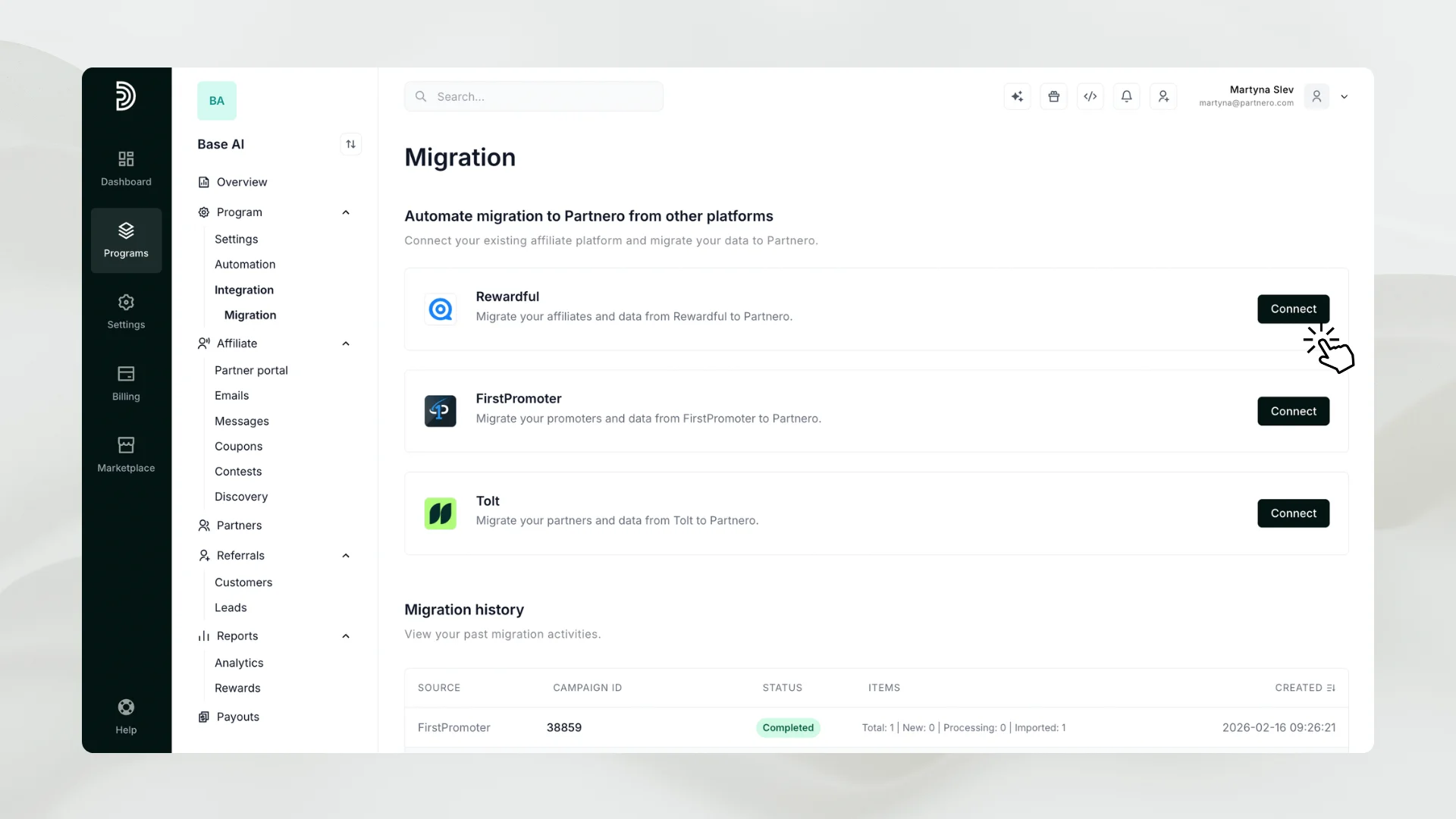
Open your program, expand Integration in the menu and select Migration. Click Connect next to Rewardful:
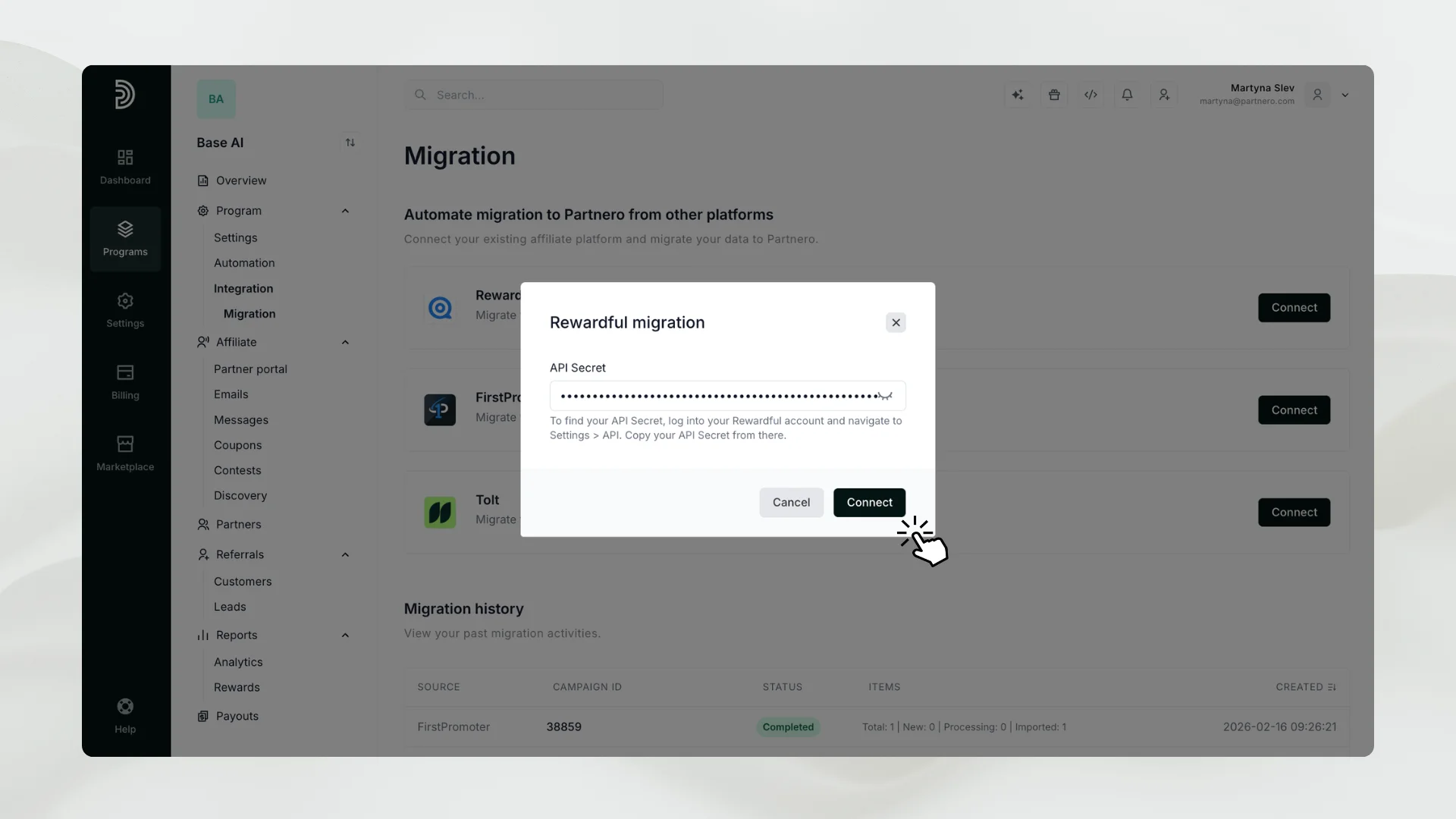
Find your API Secret in Rewardful under Company Settings → API Credentials and paste it to connect:
3. Select Campaign
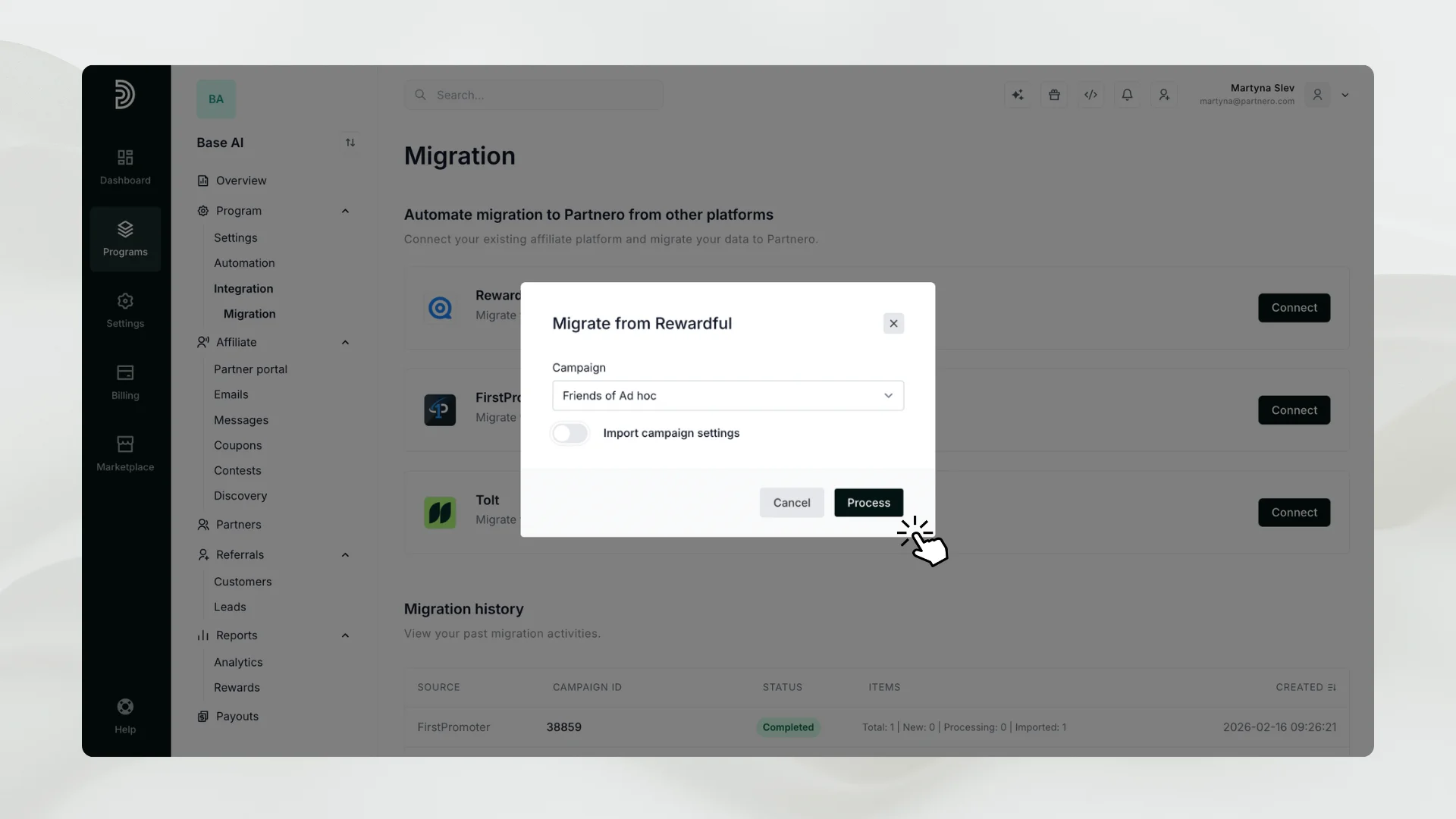
Now that your Rewardful account is connected, click Migrate and select the campaign you want to import. You can also bring over campaign settings for consistency.
4. Start Migration
Click Process. Partnero imports:
- Partners and their profiles
- Customers and transactions
- Clicks, signups, and revenue history
5. Monitor Progress
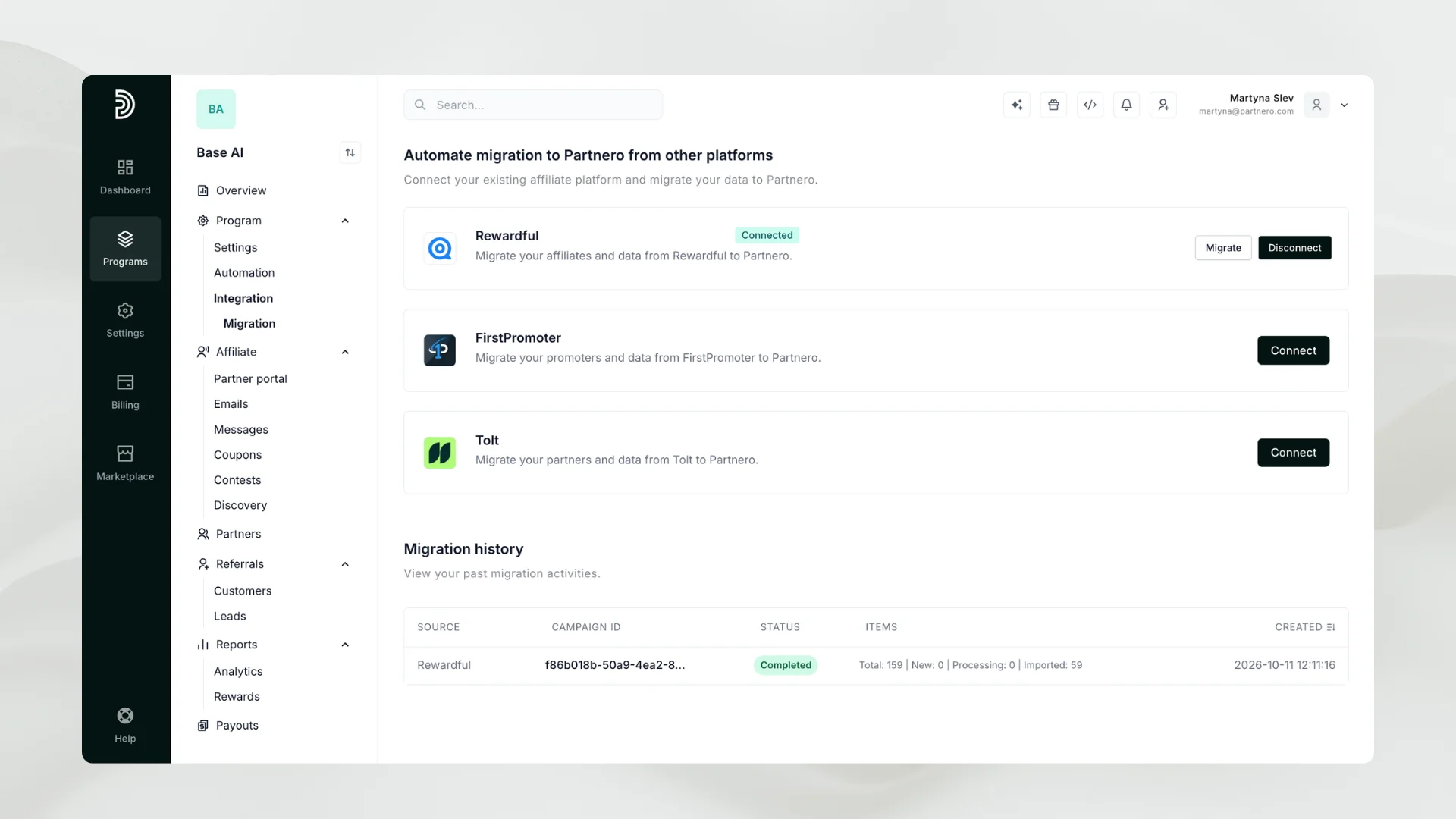
Larger programs take longer because Rewardful applies API rate limits. The migration runs in the background, and you can return to this page at any time to check its status.
6. Verify and Launch
Once the migration shows Completed, review the imported data and continue running your program.
For full details, visit: Migrate from Rewardful to Partnero.
Flexible Integration Options
Partnero supports all the standard integration approaches you may already be used to, while also offering more flexible and extensible options, providing flexibility no matter your tech stack or workflow. You can choose from ready-made plugins for popular platforms like Shopify and WooCommerce; use Partnero’s REST API, JavaScript tracking, Universal integration or webhooks for deeper custom workflows; or leverage pre-built guides to streamline setup. In addition to these core methods, Partnero supports no-code automation via tools like Zapier and Make, giving you even more flexibility to tailor how your partner program fits into your business systems. If you’re unsure which approach is best, our support team can recommend the ideal solution for your setup.
Optimizing Your Program After Migration
After moving to Partnero, you can improve program performance with these tips:
- Upgrade your partner portal: Offer your partners a modern, user-friendly, branded dashboard to track performance, earnings, and progress in real time.
- Implement powerful rewards: Use tiered, dynamic, product-based commissions to motivate & reward partners.
- Automate and optimize: Use Partnero AI to simplify your workflows, optimize partner selection, and accelerate results.
- Automate payouts: Streamline payout processes with Partnero’s automated payment tools, ensuring your partners are paid accurately and on time.
- Simplify partner acquisition: Use embeddable and pop-up partner signup forms for a frictionless signup process.
Start Your Migration Today
Migrating from Rewardful to Partnero is simple, secure, and controlled. With automated data import, reliable processes, and ongoing support, your partner program will gain advanced features, better insights, and more flexibility.
Start migrating now, or get in touch with our support team if you have any questions or concerns!
Frequently Asked Questions (FAQ)
No. Partnero imports all program data directly when you connect your account.
It depends on program size. Rewardful applies API rate limits, so larger programs take longer. The migration runs in the background.
You can choose to import campaign settings along with the campaign data. Review them after the migration and adjust as needed.
Yes, you can create multiple affiliate programs on Partnero and migrate different campaigns to each program.
No. Migrating from Rewardful to Partnero is free, including the automatic data import and support from our team.
Launch your program in minutes or get in touch for advanced setups.
Fast setup & easy migration
Connect Partnero to your tools, with support if you’re switching platforms.Automated, transparent payouts
Pay partners on schedule and save hours. No spreadsheets or manual errors.
Affiliate and referral program software trusted by 1,500+ businesses. Connect with Stripe, Paddle, Shopify and more.


Product updates, affiliate marketing tips, and growth insights.