Affiliate Campaigns: Onboard, Engage and Reactivate Partners Automatically
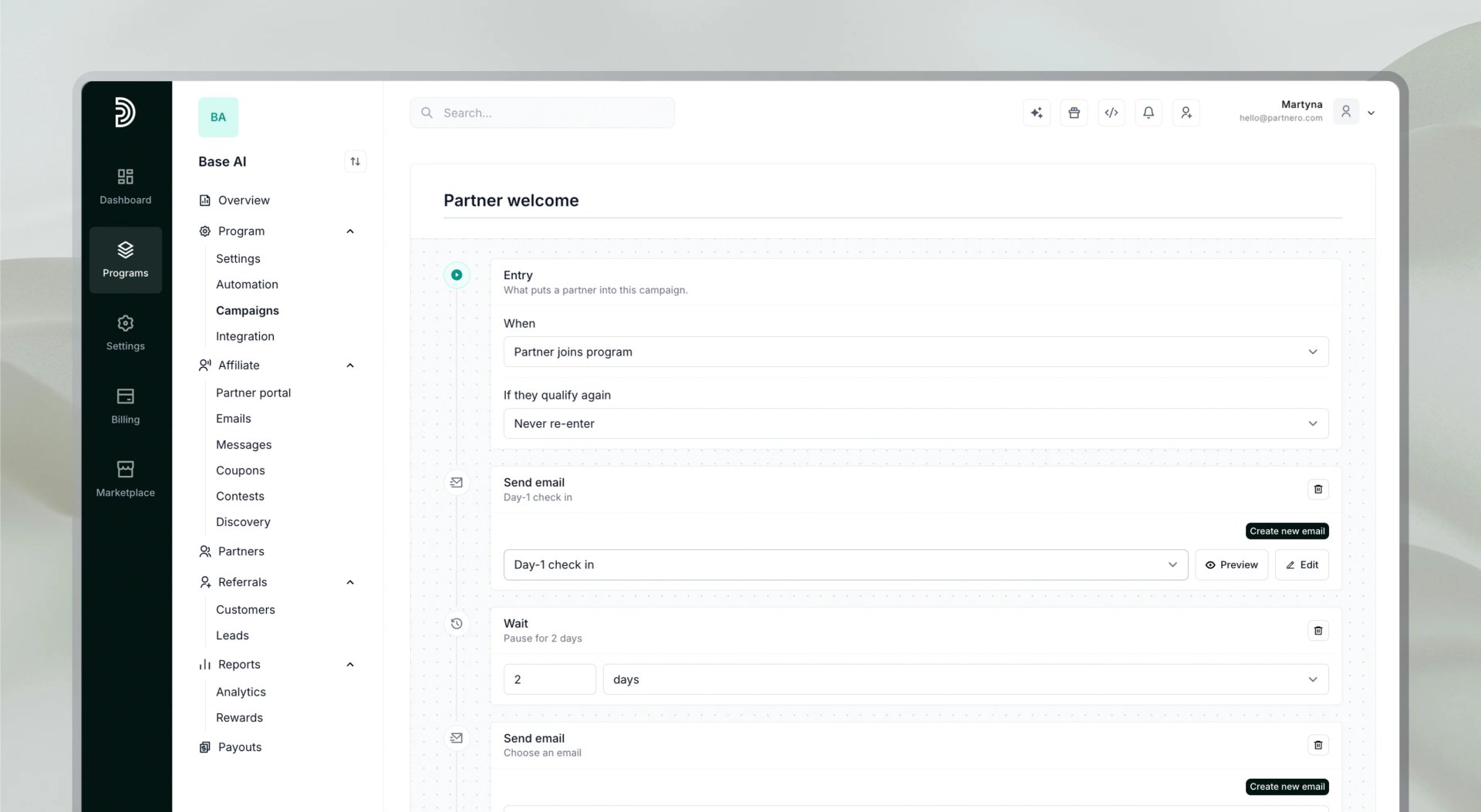
A partner program involves more than the sign-up. Affiliates need guidance at the start, help making the first referral and the first sale, recognition when they succeed, and a reason to come back when they go quiet. Campaigns let you cover that whole lifecycle automatically, from the day a partner joins to the point they are actively promoting, with each message sent at the right time.
A campaign is a sequence of steps that runs for each partner over time, based on what they do (or do not do) in your program. It combines emails with waits, conditions, and tags, so each partner gets a message that fits where they are. You set it up once, and every partner gets the right message at the right moment without you tracking who needs what.
This article covers what Campaigns are, why sequences work better than one-off emails, how to build one, and what changes for your program.
What are Campaigns
A campaign is a series of steps that Partnero runs over days or weeks, starting when something happens in your program. A partner joins, earns a first commission, or goes quiet for a month: each of these can start a campaign.
Every campaign has four parts:
- An entry trigger that decides who goes in
- Steps that run one after another: waits, emails, conditions, and tags
- Exit conditions that take a partner out early, for example once they have made a sale
- A re-entry rule for partners who qualify a second time
Partnero already had two ways to email partners. Campaigns cover cases the others don't.
Feature | Best for |
|---|---|
A single notification, such as a welcome or a payout receipt | |
One action in response to one event, such as adding a tag or sending an email | |
A message that takes several emails, spread over time, with branching along the way |
In short, an automation is one thing happening once. A campaign is a series of things happening on a schedule.
Why sequences work
Partners do not need one big message. They need the right small message at the right time. Campaigns are built around that.
- Timing follows behavior. A message about first steps lands better on the day a partner joins than three weeks later. Campaigns start from real events in your program, so the email arrives when it is relevant.
- Messages adapt to progress. A condition step checks signups, customers, revenue, or tags, and sends the partner down a Yes-or-No path. A partner who has already referred someone gets different advice than one who has not.
- Sequences stop when they work. Exit conditions are checked before every step. If a sequence is chasing a first sale and the partner makes one, the reminders stop. Nobody gets nagged about something they have already done.
- Every partner gets the same care. A partner who joins at 2 a.m. on a Sunday gets the same onboarding as one who joins on a Monday morning, with no manual work from you.
- Inboxes stay protected. By default, a partner receives at most one campaign email per day across all your campaigns. Emails over the limit are held back and sent later, not dropped.
How a campaign works
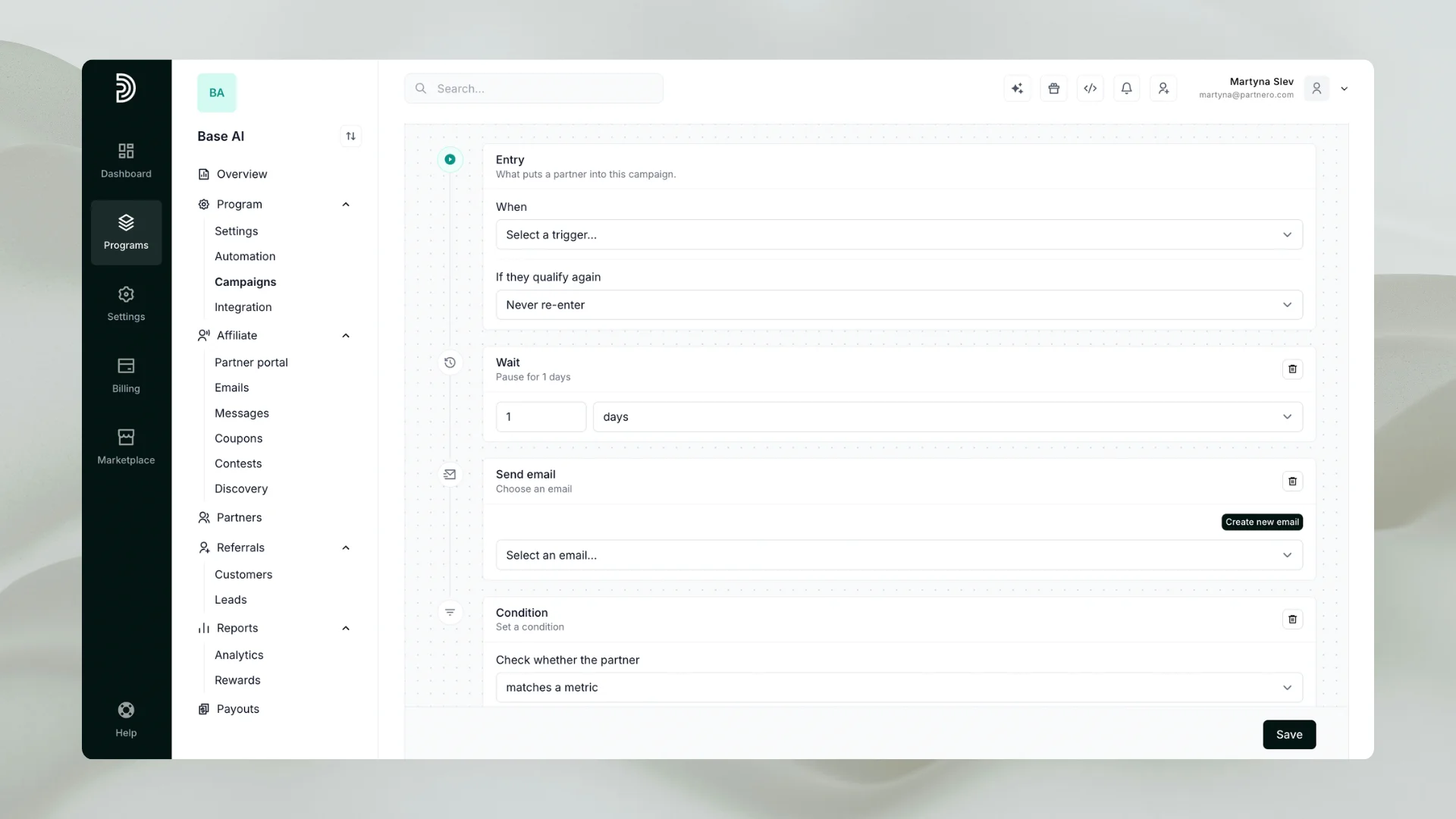
Choose who enters: Each campaign has one entry trigger. You can start from a partner joining, making a first signup, generating a first sale or earning a first commission. You can also start from a milestone (for example, 10 signups), a joining anniversary, or a period of inactivity: a partner who has not logged in or referred anyone for a set number of days, or whose last referral is older than that. A tag added to a partner can start a campaign too, which is how you enroll someone by hand.
Build the sequence: Steps run top to bottom, and a campaign can hold up to 50 of them. There are five kinds:
- Wait pauses the sequence for minutes, hours or days
- Send email sends one of your custom emails
- Condition splits partners into a Yes and a No path based on a metric or a tag
- Add tag and Remove tag record progress or start something else
Steps with nothing between them run immediately, so a wait goes wherever you want time to pass.
Set exit conditions: These are optional rules that take a partner out of the campaign early, such as stopping a nudge sequence once a partner has referred a customer.
Decide on re-entry. If a partner qualifies again, the campaign can ignore them (the default), let them in again after a cooldown, or let them in every time. A welcome sequence should run once. A re-engagement sequence usually wants a cooldown. An anniversary campaign should run every year.
Personalize the journey with conditions and tags
Conditions and tags are what turn a fixed series of emails into a sequence that responds to each partner.
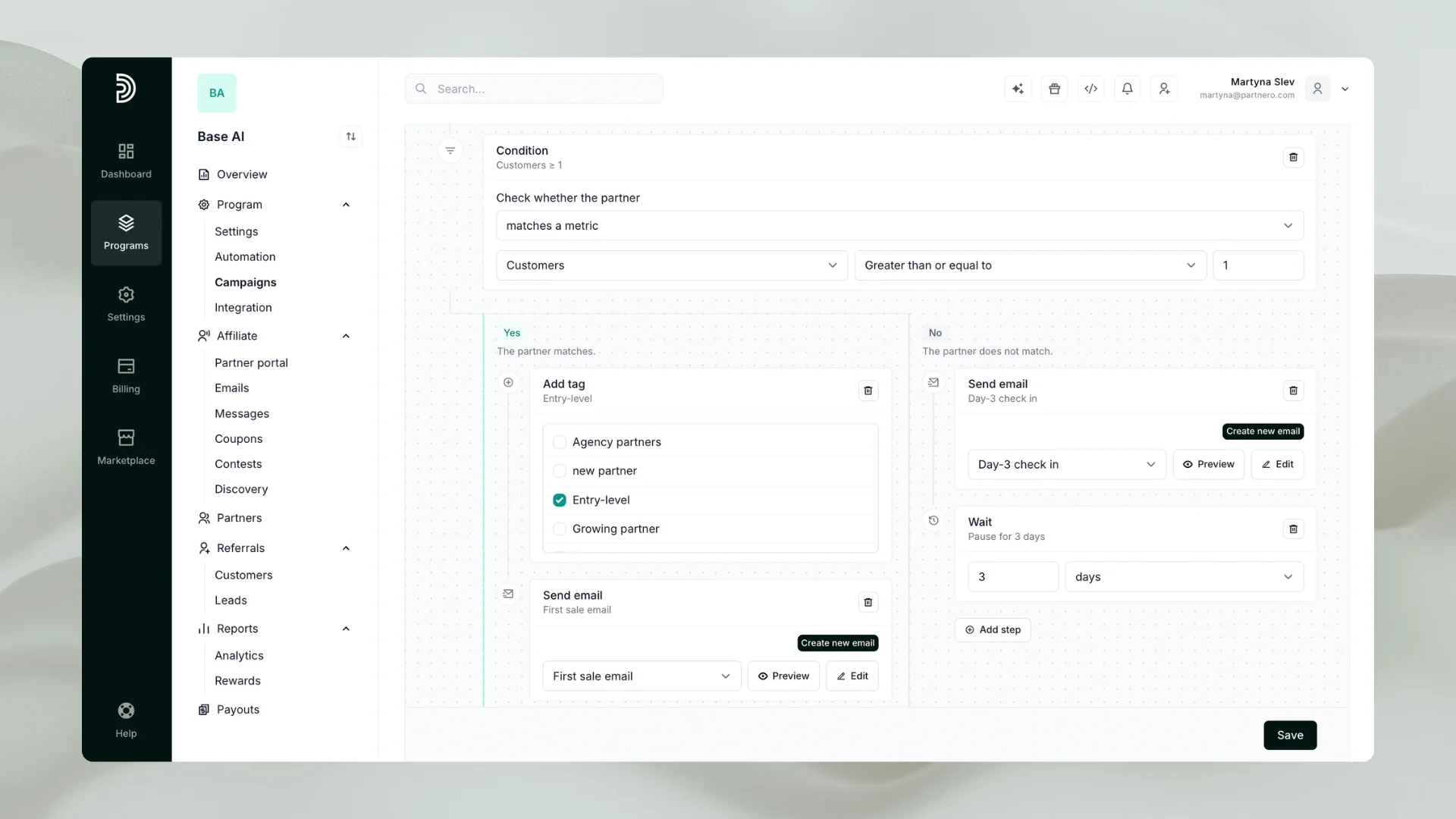
Conditions ask a question about the partner when they reach that step. You can check signups, customers, revenue (all time or recurring), or whether the partner has a specific tag. Partners who match go down the Yes path, and everyone else goes down the No path. Each path has its own steps, and conditions can be nested up to three levels deep. Steps placed after the condition run for everybody, so a shared ending only has to be written once.
Tags keep track of where each partner stands. Add tag and Remove tag steps can:
- Record how far a partner got, so you can segment them later
- Set up the condition that a later step in the same campaign checks
- Start something else, because a tag added in one campaign can be the entry trigger for another campaign or an automation
The last point lets you chain campaigns together. For example, tag partners who complete onboarding, and let that tag start a separate campaign for partners who are ready for the next stage. Each tag also records which campaign applied it, so you can always see why a partner has it.
Start from a template
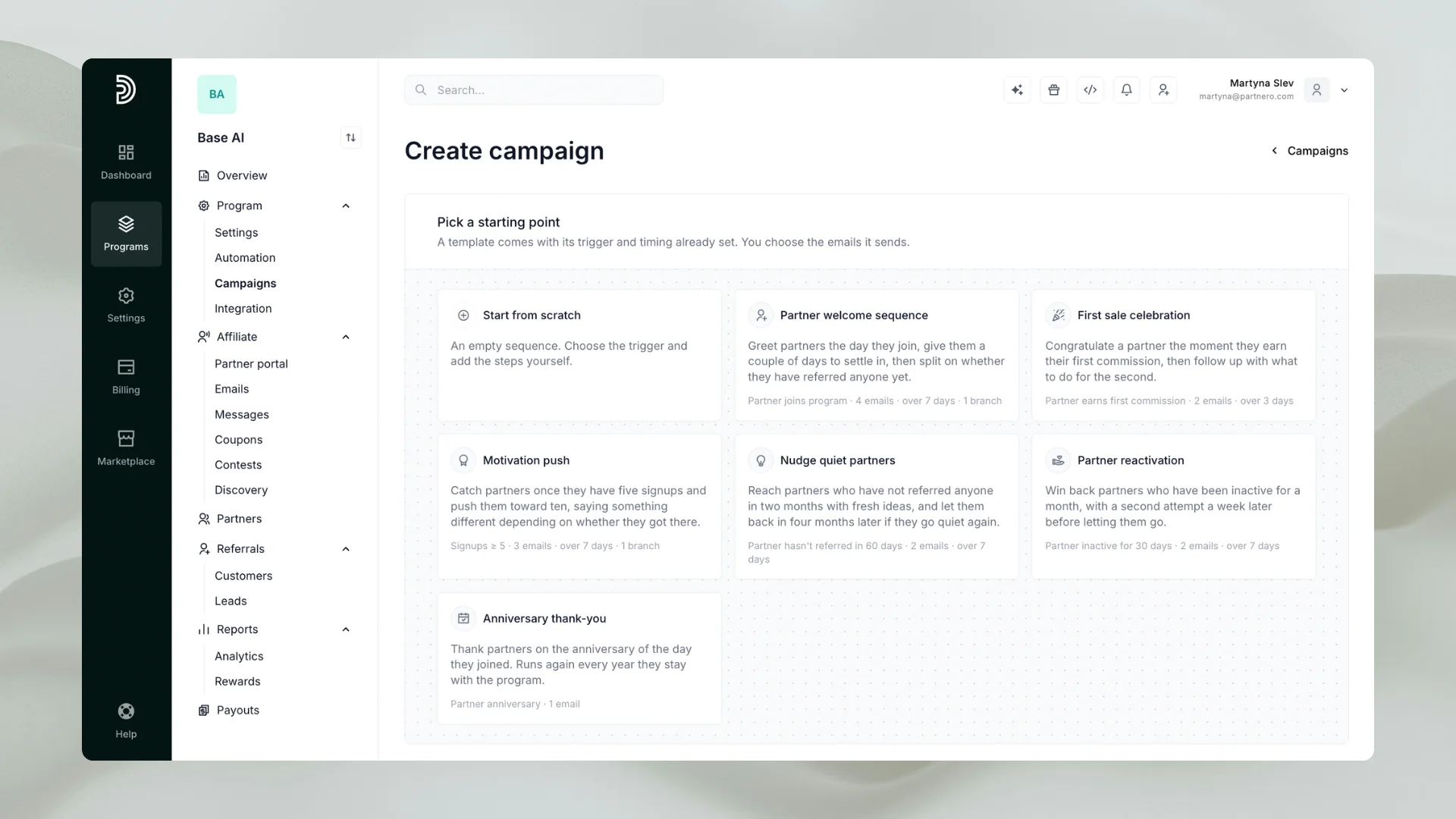
The hardest part of a sequence is usually timing, so Campaigns come with six templates. Each one arrives with its trigger, waits, and branches already set. You only choose the emails it sends.
Template | Starts when | What it does |
|---|---|---|
Partner welcome sequence | A partner joins the program | Greets them, waits, then splits on whether they have referred anybody yet |
First sale celebration | A partner earns their first commission | Congratulates them, then follows up with what to do for the second |
Motivation push | A partner reaches 5 signups | Pushes toward 10, saying something different depending on whether they got there |
Nudge quiet partners | A partner has not referred anybody in 60 days | Sends fresh ideas, and lets them back in 120 days later if they go quiet again |
Partner reactivation | A partner has been inactive for 30 days | Makes two attempts a week apart before letting them go |
Anniversary thank-you | A partner's joining anniversary | Thanks them, and runs again every year they stay |
If none of them fits, start from scratch and build your own.
Three ways to use Campaigns
These are examples of how a program could use the templates. The emails themselves are yours to write.
Onboard new partners
A partner joins and gets a welcome email straight away. The campaign waits a few days, then checks whether they have referred anyone. If they have, the next email covers how to get more referrals. If not, it shares ideas and assets to help them get the first one. Everyone is onboarded the same way, and each partner gets advice that fits where they are. Set this one to never re-enter, since nobody joins twice.
Celebrate the first commission
A first commission is a good moment to reach out. The campaign congratulates the partner, then follows up with a second email about what to do next to earn another.
Win back partners who went quiet
When a partner has been inactive for 30 days, the campaign sends a first attempt, waits a week, and sends a second. Set an exit condition so the sequence stops if the partner refers a customer in the meantime. If the partner still has not responded after the second attempt, an Add tag step can mark them as inactive, so you can review those partners or segment them later. Use re-entry after a cooldown, so a partner who goes quiet again months later gets another chance without being chased every month.
The same pattern works for milestones, such as encouraging a partner at 5 signups to reach 10, and for anniversaries, such as a yearly thank-you.
What changes for your program
Campaigns do not replace a good program. They ensure the follow-up around it happens every time.
- Less manual work. Onboarding, nudges, and check-ins run on their own once set up, so your time goes to partners who need a personal conversation.
- Engagement at every stage. Onboarding, recognition, and re-engagement run on their own, and partners who stall get a prompt to act again.
- Consistent partner experience. Every partner goes through the same journey, whenever they join.
- Clearer picture of what works. Each campaign has an overview of how many partners were triggered, are in progress, completed, or left early, and how many emails were sent. A step table shows where partners are right now and which steps were skipped or failed, and a list of recent activity lets you confirm it is doing what you expect.
You stay in control after launch. You can edit a live campaign and partners keep their place. You can disable one to pause it, and partners resume from the step they were on when you switch it back on.
How to get started
Campaigns are available in affiliate programs, under Program → Campaigns.
- Check your email settings. Campaigns send through your program's existing setup, so confirm the sender name, sender address, reply-to address, and branding under Emails in Partner portal. Here's how.
- Write your emails. A Send email step can only use custom emails you have written. You can also create one from inside the builder. Here's how.
- Create the campaign. Click Create campaign and pick a template or start from scratch. Name it; only you will see.
- Choose the emails and exit rules. Pick an email for each Send email step and add any exit conditions.
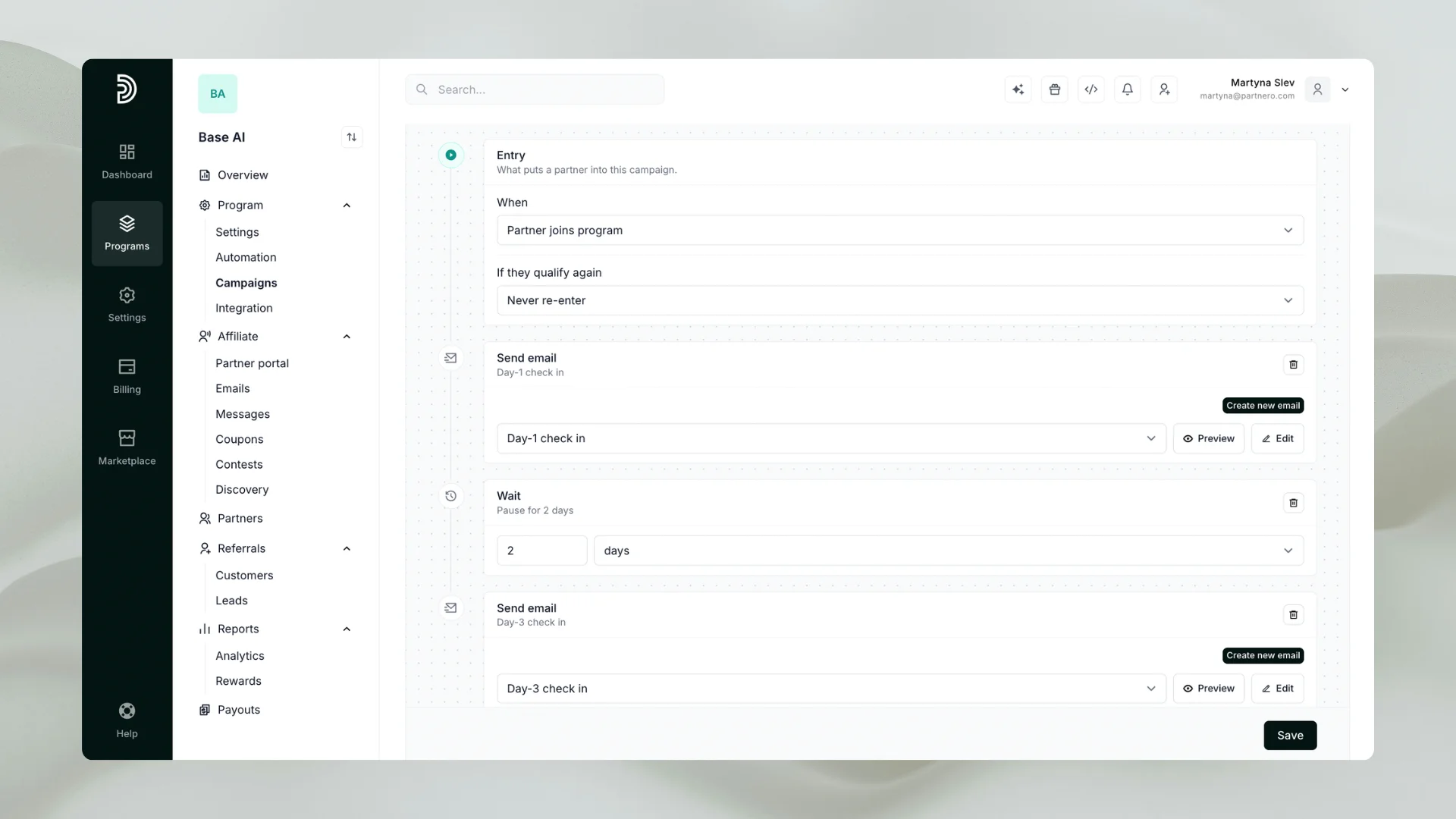
- Save and switch on. A new campaign is always saved switched off, so you can build it over several sittings. It will not switch on until every step is complete, and Partnero lists exactly what is missing.
Before you switch it on: Event triggers, such as joining or a first sale, only enroll partners from the moment the campaign goes live. Inactivity triggers work differently. They check everyone, so partners who are already past the threshold all enter on the first hourly check. If you set 30 days and some partners have been quiet for a year, they all enter at once. Check how many partners already qualify before you switch it on.
Start with one campaign
You do not need to automate everything at once. Pick the moment where partners most often drop off, whether that is the first week after joining or the first month without a referral, and build one campaign around it. Use a template, write the emails, and watch the overview for a few weeks.
Ready to try it? Sign up for a free Partnero trial and build your first campaign today. No credit card is required. For the full setup details, see the Campaigns documentation.
Frequently asked questions
Affiliate campaigns are sequences of actions and emails that Partnero sends to your partners over days or weeks. A campaign starts when something happens in your program, such as a partner joining or going quiet, and runs through steps you define: waits, emails, conditions and tags.
Yes. Campaigns are available on every Partnero plan. Try Campaigns during the 30-day free trial.
A partner joining, a first signup, a first sale or a first commission can each start one. So can a milestone such as 10 signups, a joining anniversary, a period of inactivity, or a tag added to a partner.
Yes. Exit conditions are checked before every step. For example, you can end a sequence once a partner has referred their first customer, so they stop receiving reminders.
By default, a partner receives at most one campaign email per day across all your campaigns. Emails over the limit are held back and sent later, not dropped.
Yes. You can edit a live campaign and partners keep their place in the sequence. If you disable it, new partners stop entering and everyone already inside waits where they are until you switch it back on.
Launch your program in minutes or get in touch for advanced setups.
Fast setup & easy migration
Connect Partnero to your tools, with support if you’re switching platforms.Automated, transparent payouts
Pay partners on schedule and save hours. No spreadsheets or manual errors.
Affiliate and referral program software trusted by 1,500+ businesses. Connect with Stripe, Paddle, Shopify and more.

Product updates, affiliate marketing tips, and growth insights.