How to Find Affiliate Partners with AI and Manage Outreach Without Losing Track
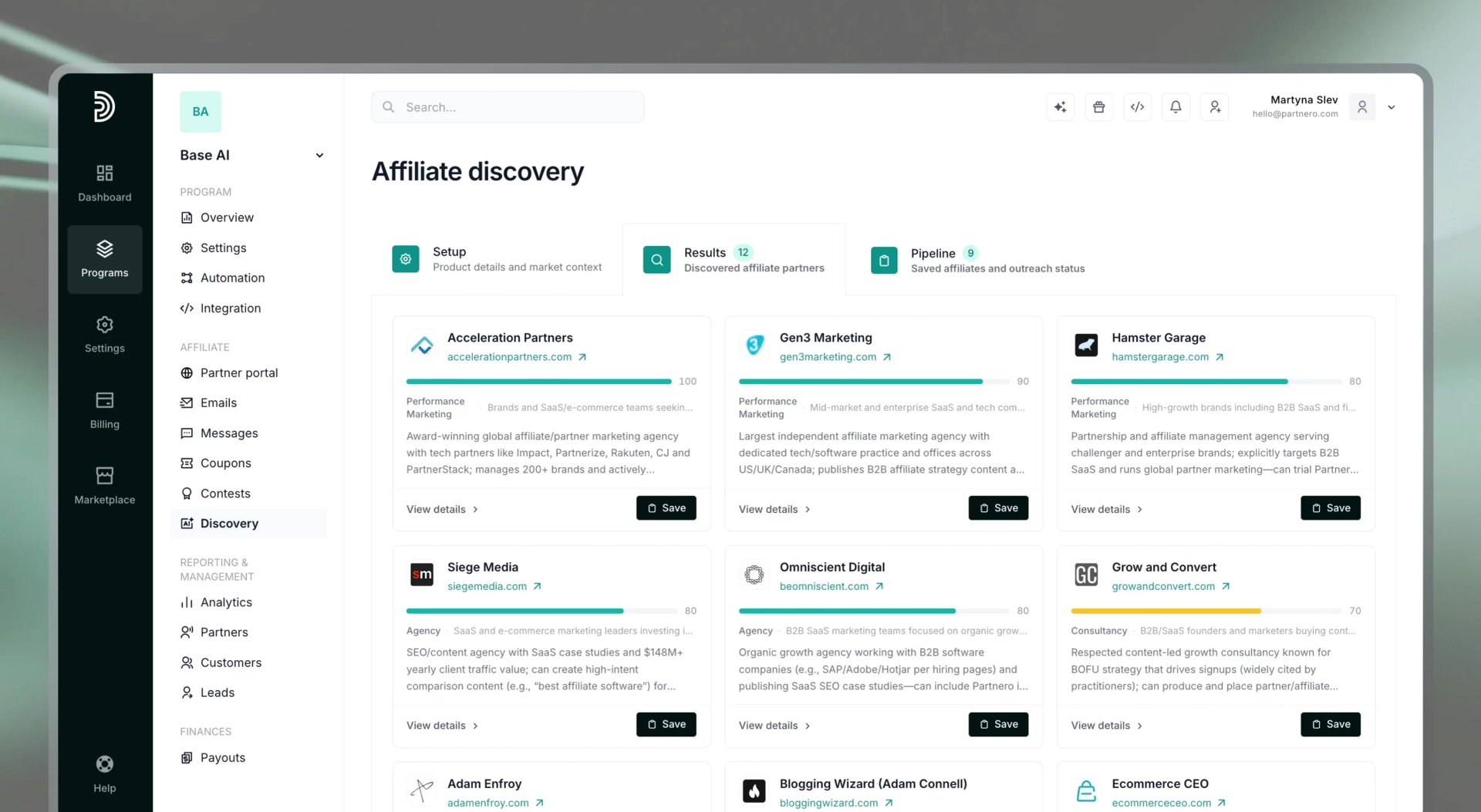
Most affiliate programs do not fail because of bad tracking or complicated commission structures. They stall because finding the right partners is genuinely difficult work, and most tools leave you to figure it out on your own.
Generic influencer directories give you reach without fit. Manual prospecting, searching for relevant blogs, YouTube channels, and newsletters one by one, takes hours and produces results that are inconsistent at best. Many programs launch with a short list of personal contacts and then quietly lose momentum when that list runs dry.
Partnero's AI Affiliate Discovery is built specifically for this problem. It identifies affiliate candidates relevant to your product, audience, and niche, and returns them with enough context to evaluate and act on each one. And with the addition of a built-in outreach pipeline, the feature has become a full recruitment workspace, not just a list.
This article walks through how Discovery works, how to get the most out of it, and how the pipeline turns your results into an ongoing outreach system.
Why affiliate recruitment is harder than it looks
When people plan an affiliate program, they tend to focus on the mechanics: commission rates, tracking setup, payout workflows. Those are all solvable problems with clear answers.
Recruitment is different. There is no shortage of affiliates in the world, but finding ones who are actually relevant to what you sell, whose audience overlaps with your customer profile, whose content style fits your brand, and whose incentives align with your program is a filtering problem with a very large input set and no obvious starting point.
The approaches that most teams fall back on are slow and imprecise. Cold searches on social media and YouTube yield a mix of big creators who will not respond and small ones whose audiences don't fit. Affiliate directories and networks tend toward volume over relevance. Competitor research helps at the margins but rarely surfaces candidates you could act on quickly.
The result is that affiliate recruitment often becomes the bottleneck, preventing a well-set-up program from growing as it should.
How AI Affiliate Discovery works
Partnero's AI Affiliate Discovery approach to the problem differs. Instead of giving you a database to search, it generates a curated candidate list based on what you actually need: your product, your audience, and the competitive landscape you operate in.
The setup takes a few minutes and follows three steps.
1. Product details
You start by describing your product. At a minimum, you enter your website. From there, you can write a description manually or use the Analyze website option to have AI pull the relevant details for you.
The quality of your input directly affects the quality of your results. A description that highlights your core features, target customer, and industry will produce more relevant candidates than a generic one. If your product solves a specific problem for a specific type of buyer, say so. That specificity is what the AI uses to filter for fit.
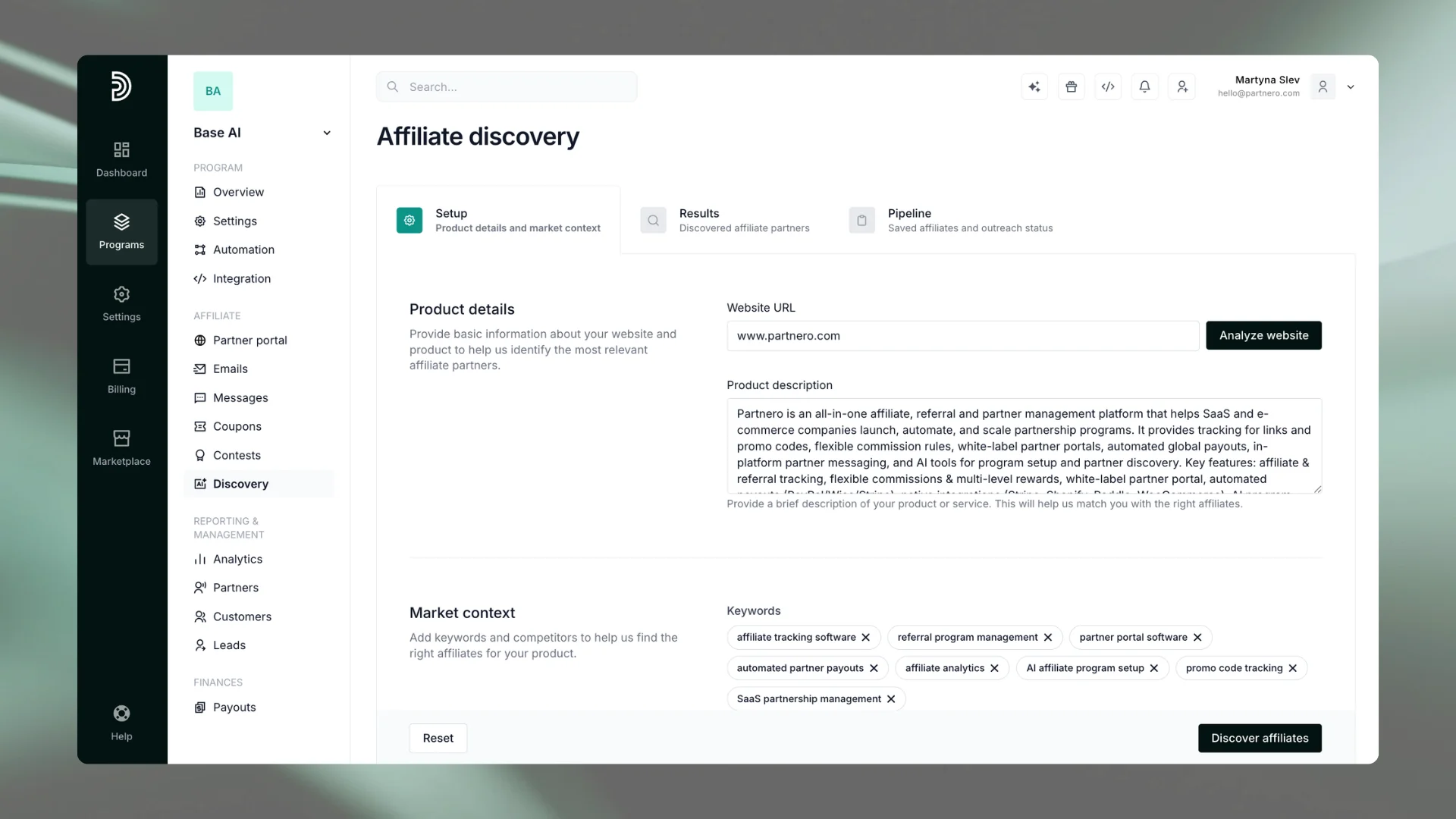
2. Keywords and competitors
Next, you add the keywords your potential customers use when looking for a solution like yours—these anchor the discovery to your actual market rather than your category in the abstract.
You can add competitors manually or use AI to suggest them based on the keywords you have provided. Either way, you can review and edit the list before proceeding. This step matters: the competitor set shapes which publishers and content creators the AI considers relevant, so it is worth spending a moment to make sure it reflects the space you actually compete in.
Once you are happy with both the keywords and the competitor list, click Discover affiliates.
3. Discovery results
Partnero's AI returns a curated list of affiliate candidates tailored to your inputs. Each result includes:
- Website: where the affiliate publishes or operates
- Business type: content creator, agency, tool, media publication, etc.
- Audience type: who they reach
- Relevance score: how well they match your product and niche
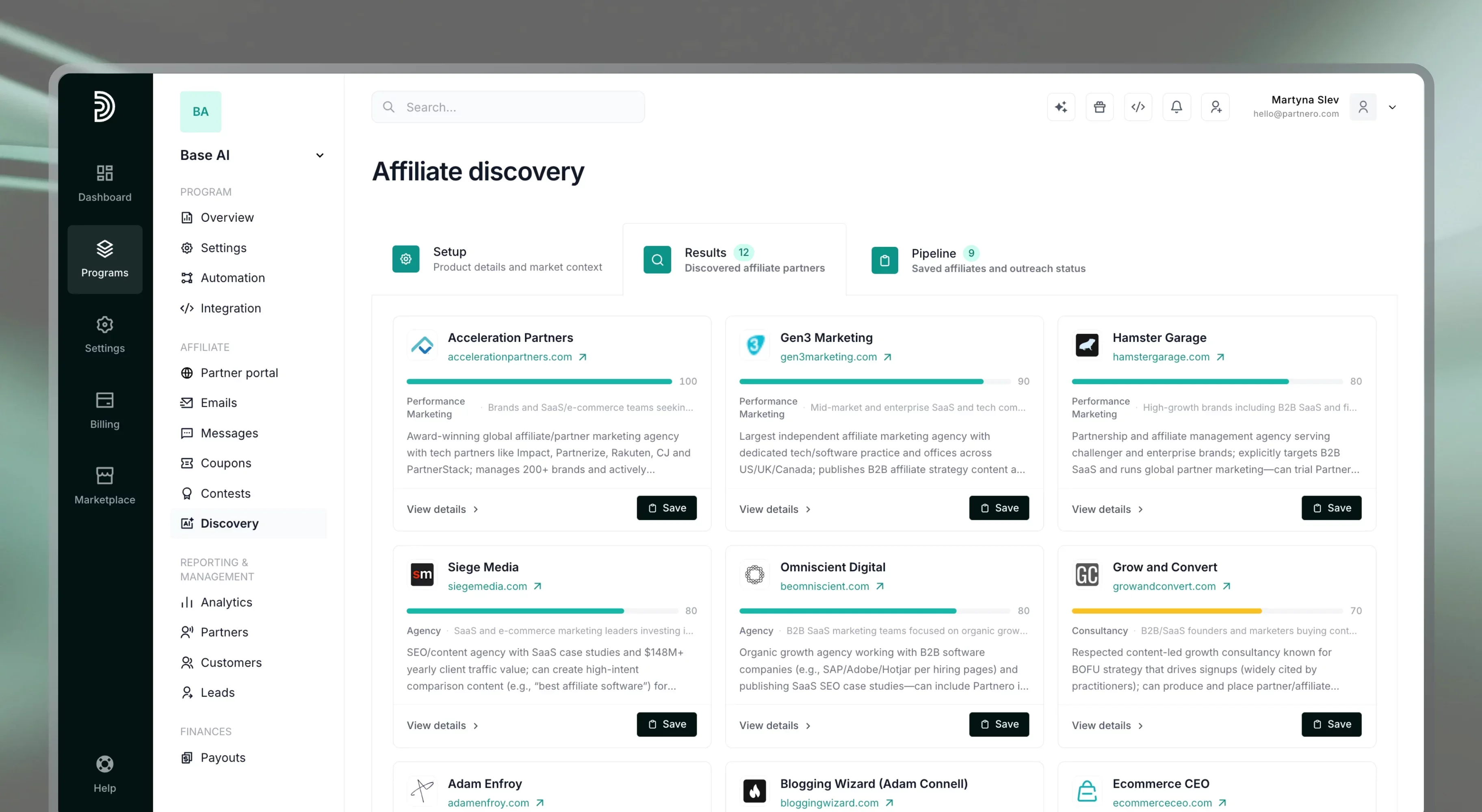
To learn more about any candidate, click View details. This surfaces suggested contact information and a ready-to-use outreach draft, so you can move from evaluation to first contact without leaving the platform.
The outreach draft Discovery generates for each candidate is a starting point, not a fixed script. You can edit it to match your voice, and save your edits as a reusable template, so future outreach pulls from your own wording instead of the generic default every time
From list to pipeline
A list of affiliate candidates is only useful if you do something with it. This is where most discovery tools stop short: they surface names and URLs, and then leave the follow-through to you, in a spreadsheet or a notes app or nowhere at all.
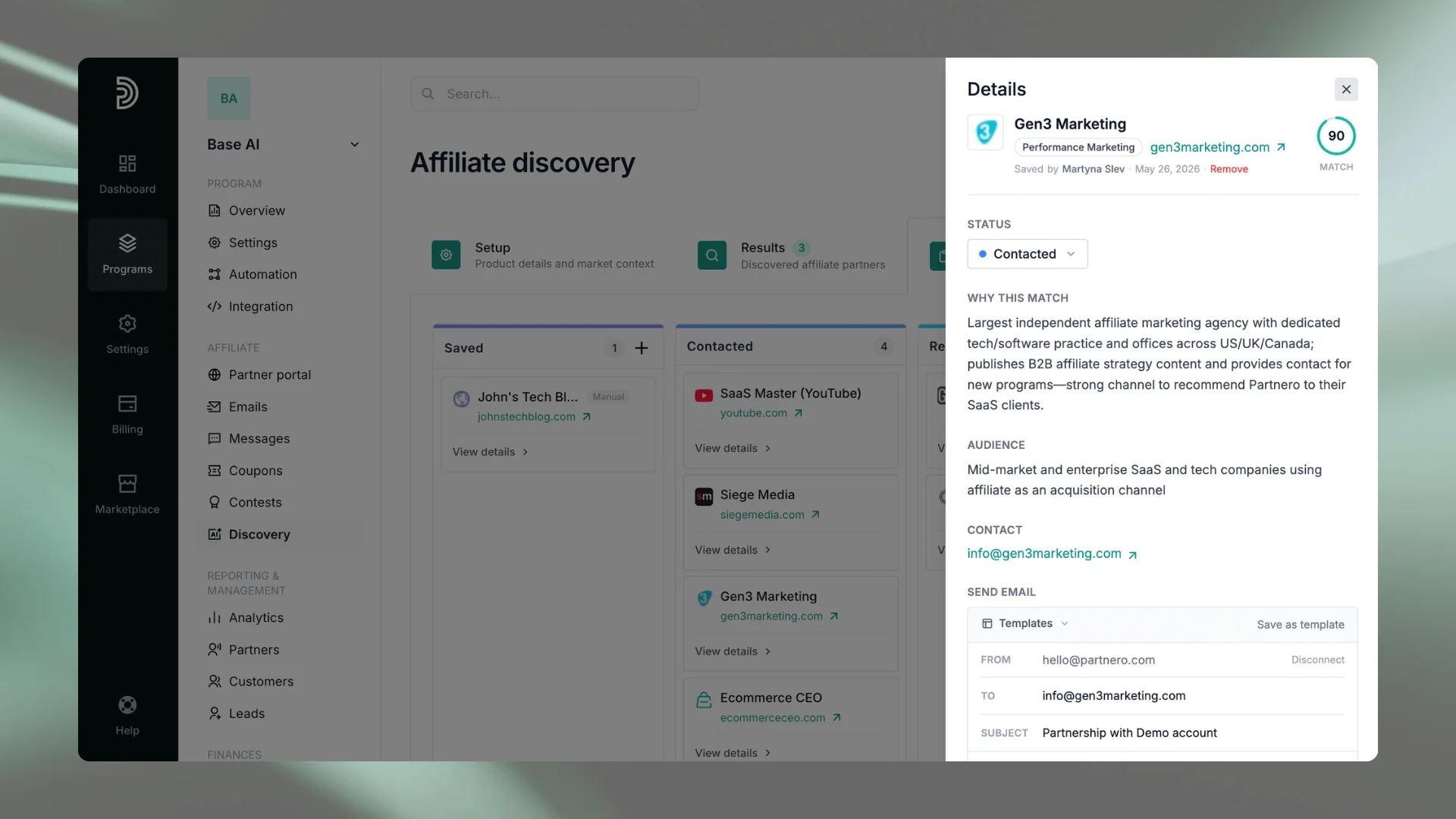
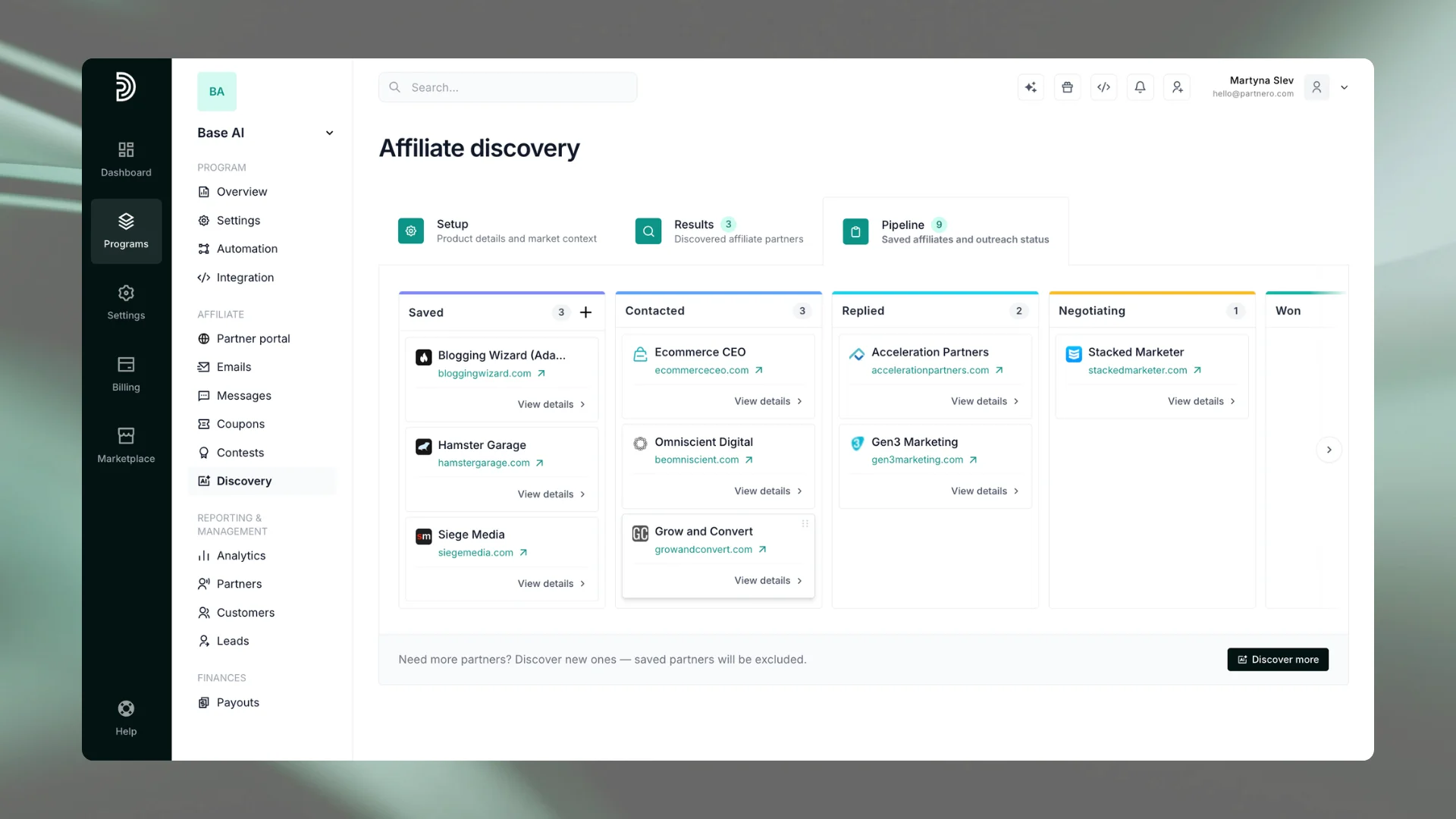
Partnero's Pipeline changes that. It is a CRM-style board built directly into the Discovery feature, designed to take promising candidates from a search result through to an active partnership (and contact them along the way) without leaving Partnero.
Saving affiliates
When you identify a candidate worth pursuing in the Results tab, you Save them to your Pipeline. Saved affiliates appear in the first column of the board and remain there regardless of what you do with your discovery results, including running a completely new search. They also stop appearing in future search results, so you will not rediscover people you have already evaluated.
You're not limited to candidates Discovery surfaces. If you already have a lead in mind - someone you found on social media, a referral, or a contact from a conference - you can add them to the Pipeline manually. This keeps the Pipeline as your single source of truth for outreach, regardless of where a candidate came from.
Six stages, one view
The Pipeline moves affiliates through six stages:
- Saved
- Contacted
- Replied
- Negotiating
- Won
- Declined
Each stage maps to a real point in the outreach process. You move an affiliate from Saved to Contacted once you have reached out. If they reply, you move them to Replied. Negotiations in progress sit in Negotiating. Closed partnerships go to Won; non-starters go to Lost.
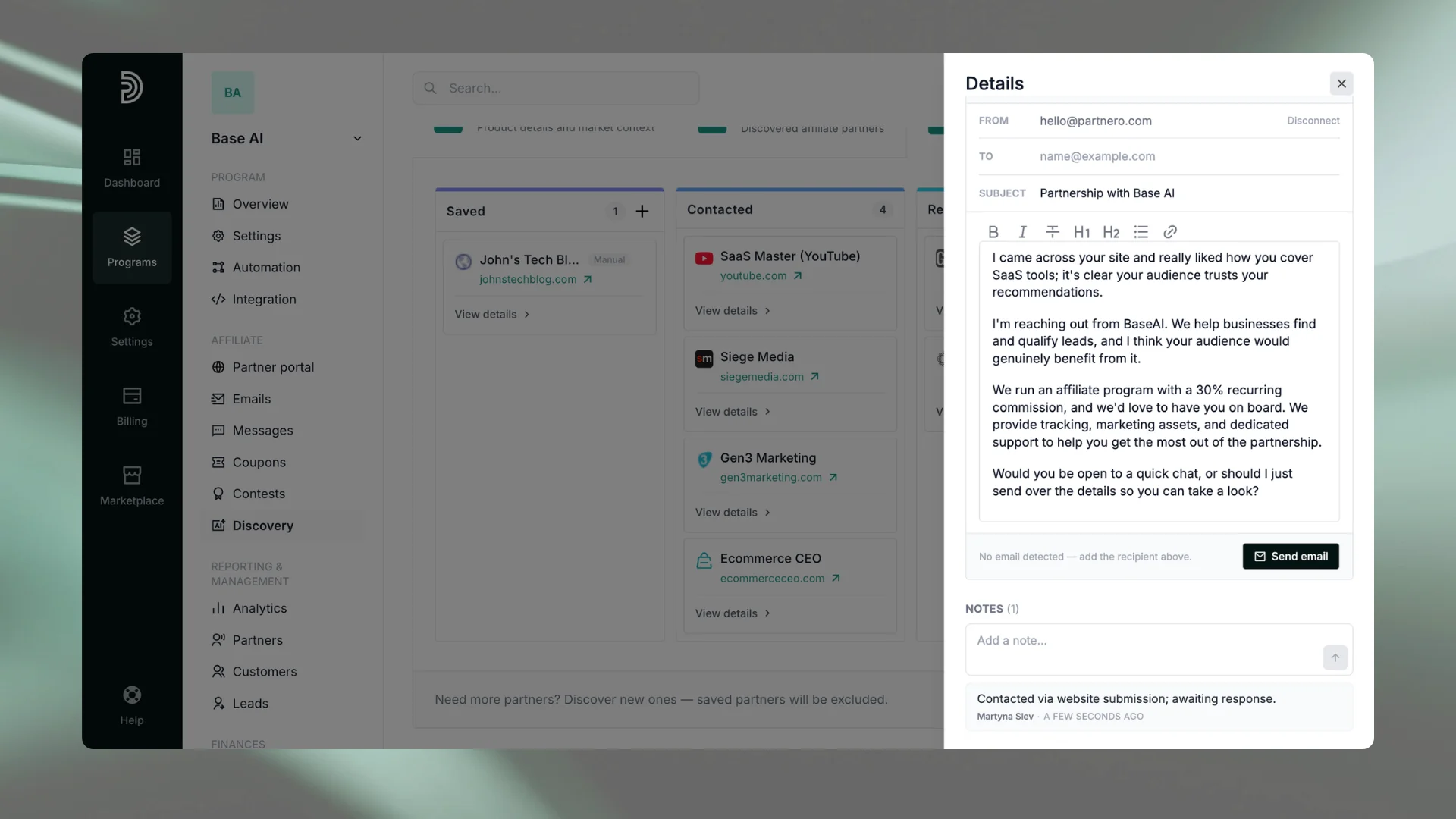
At any point, you can open an affiliate's card and add notes: a summary of the conversation, a reminder about their preferred rate, anything relevant.
What the pipeline is (and is not)
The Pipeline is a tracking workspace and an outreach tool. You can send affiliate outreach emails directly from any pipeline card by connecting your Gmail account — no need to switch between tabs or tools. Replies go to your connected Gmail inbox, and each sent email is automatically logged in the card's timeline and moves the affiliate to Contacted.
It is also a shared workspace. Everyone on the team can see each affiliate's current status and read notes left by others. Each note shows who added it and when, so there is no guessing who has been contacted, what was discussed, or where a negotiation stands. If multiple people are involved in recruitment or ownership shifts between team members, the Pipeline keeps everyone aligned without requiring a separate status update.
For anyone running a program without a dedicated partner manager, this matters more than it might sound. Affiliate recruitment tends to be intermittent work. You spend a few hours on it, set it aside, and come back days or weeks later. Without a structured record, you lose the thread. The Pipeline keeps it.
Getting better results from Discovery
A few things that make a meaningful difference:
- Write a specific product description. The more precisely you describe what your product does and who it is for, the more relevant your candidates will be. Vague descriptions produce generic results. If you target a particular vertical, such as SaaS, e-commerce, or B2B services, name it.
- Use Analyze website as a starting point, not a final answer. The website analysis is a useful shortcut, but it may not capture everything that matters about your product. Review what it generates and add anything that the copy on your site undersells.
- Curate your competitor list. The AI will suggest competitors based on your keywords, but the suggested list is not always complete or perfectly calibrated. Add missing direct competitors, remove tangential ones, and treat the final list as the lens through which discovery filters its results.
- Save candidates early. You do not have to contact someone before adding them to the Pipeline. Saving an affiliate as soon as you identify them as relevant, even before you draft an outreach message, keeps them out of future searches and gives you a record to come back to.
- Run discovery more than once. If your initial results skew toward a particular content type or geography, adjusting your keywords or competitor set and running again can surface a different mix. Discovery is not a one-time setup; it updates based on your inputs.
- Add prospects manually when needed. You do not have to run a discovery search to populate your Pipeline. If you already have a candidate in mind — someone you found independently or were referred to — you can add them directly by clicking the + icon in the Saved column. This keeps all your outreach in one place regardless of how you found each prospect.
Frequently asked questions
The AI analyzes your product description, keywords, and competitor list to identify relevant websites, content creators, agencies, and publishers in your niche and audience. Results are generated specifically for your inputs, not pulled from a static database.
Affiliate networks and influencer directories surface candidates based on category or follower count. Partnero's Discovery filters for relevance to your specific product, pricing model, and customer profile. The result is a shorter, more targeted list rather than a long roster that requires significant manual filtering.
Yes, with your own Gmail account connected. You can send outreach emails directly from a pipeline card using a built-in rich-text composer. Partnero sends on your behalf via the Gmail API, and replies land in your connected inbox. Partnero also generates a suggested outreach draft for each candidate to give you a starting point.
Nothing. Affiliates saved to your Pipeline persist across discovery resets. Running a new search does not affect any candidate you have already saved, and those candidates will not reappear in new results.
The number of results varies based on your inputs and niche. A more specific product description and a well-curated competitor set typically produce a tighter, more relevant set of candidates.
Yes. Affiliate Discovery is available for all affiliate programs on Partnero. No upgrade is required to access it.
Further reading: How Partnero AI Helps You Set Up, Manage, and Scale Your Affiliate Program
Start building your affiliate pipeline
AI Affiliate Discovery and the outreach Pipeline are available in your Partnero account today. If you already have an affiliate program set up, you can access it from the Affiliate Discovery section in your program menu.
If you are not yet on Partnero, start a free 30-day trial to explore the full feature set, including Discovery & the Pipeline, the AI Assistant, and the MCP Server.
Want to see how Discovery performs for your specific niche? Book a demo, and our team will walk you through it.
Launch your program in minutes or get in touch for advanced setups.
Fast setup & easy migration
Connect Partnero to your tools, with support if you’re switching platforms.Automated, transparent payouts
Pay partners on schedule and save hours. No spreadsheets or manual errors.
Affiliate and referral program software trusted by 3,000+ businesses. Connect with Stripe, Paddle, Shopify and more.

Product updates, affiliate marketing tips, and growth insights.