Affiliate Payouts Explained: How to Pay Partners the Right Way

Commissions are the engine of any affiliate program. But earning them is only half the equation. How you pay them out and how reliably you do it determines whether your partners stay engaged or quietly move on to someone who makes it easier.
Payout friction is one of the most underestimated reasons affiliate programs underperform. Partners who have to chase payments, navigate confusing processes, or wait indefinitely for approval become disengaged partners. Disengaged partners stop promoting.
Getting payouts right is not just an administrative task. It is a growth lever.
This guide covers everything you need to know about affiliate payouts: why they matter, how the process works, which settings give you control, and how Partnero handles it all in one place.
Why affiliate payouts matter more than you think
Most program managers focus on recruitment, commission rates, and conversion tracking. Payouts can be an afterthought, something handled reactively when partners ask about them. That is a mistake.
Payouts are the moment your affiliate program becomes real for a partner. Every other interaction — the sign-up, the dashboard, the referral links — is theoretical until money actually moves. When a payout goes smoothly, it reinforces trust and motivates continued promotion. When it does not, it signals that the program is not serious.
There are a few ways payout problems show up in practice:
- Partners stop promoting after their first payout is delayed or confusing.
- High-performing affiliates quietly leave for programs with simpler payment processes.
- Your team spends hours each month on manual payout admin instead of growing the program.
- Cash flow becomes unpredictable because there is no visibility into what is owed and when.
A well-designed payout system solves all of these at once. It pays partners reliably, gives your team control, keeps your books clean, and removes the friction that kills engagement.
How affiliate payouts work
At the most basic level, an affiliate payout is the transfer of earned commission from a program owner to a partner. But in practice, several things have to happen before that transfer occurs.
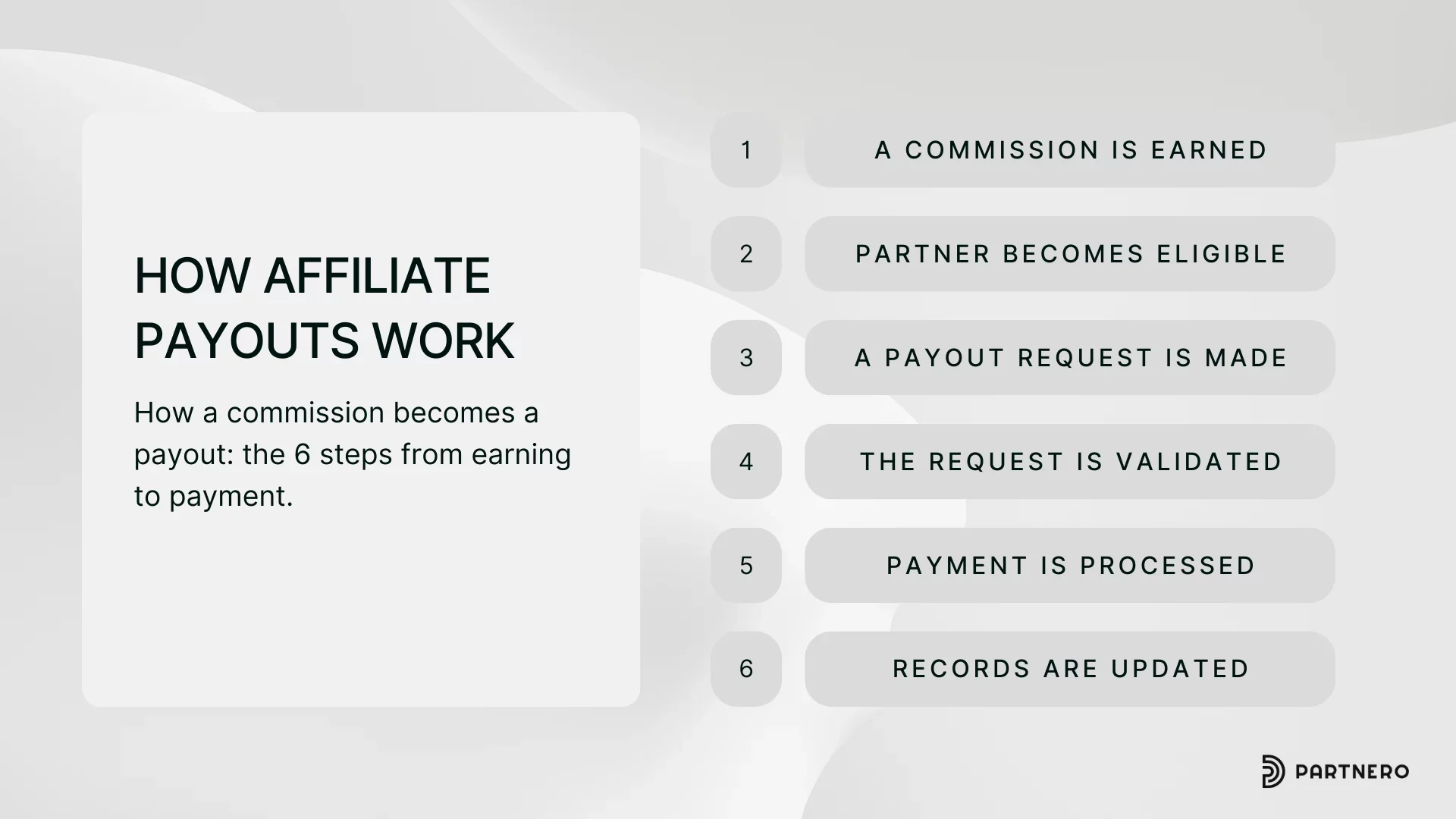
1. A commission is earned. When a partner's referral results in a qualifying action, typically a purchase, a commission is recorded in the system. Depending on your program's settings, that commission may enter a review period before it becomes eligible for payout.
2. The partner becomes eligible. Before a partner can request a payout, they typically need to meet minimum thresholds — a minimum earnings amount, a minimum number of referred clients, or both. These requirements protect you from processing large numbers of small payouts and give partners a clear target to work toward.
3. A payout request is made. Depending on how you've configured your program, partners either submit a payout request manually, or requests are generated automatically when thresholds are reached. Additionally, you can customize whether invoices and tax forms are required to request a payout.
4. The request is reviewed or auto-approved. You can choose to review all payout requests before approving them, or set the system to approve them automatically.
5. Payment is processed. Once approved, the payout is sent through your chosen payment method: PayPal, wire transfer, or another supported option.
6. Records are updated. Statuses are updated, and the transaction is logged for your records.
Each of these steps involves decisions: how much automation to apply, how much control to retain, and how much friction to put in the path of partners. Partnero gives you granular control over every one of them.
Payout methods: choosing how to pay
Partnero supports several payout methods, which you can enable or disable depending on your program's needs.
PayPal is the most common option for global affiliate programs. Partners link their PayPal account and receive funds directly. PayPal payouts can be fully automated through Partnero's PayPal Mass Pay integration, allowing you to process hundreds of payouts at once on a set schedule.
Wire transfer (bank transfer) is preferred by many professional affiliates and is the standard for international payments. Payouts via wire transfer can be automated using Partnero's Wise integration or processed manually.
Venmo is available as a payout option for programs with US-based partners.
Crypto is supported for programs where partners prefer to receive commissions in cryptocurrency. Crypto payouts are handled manually outside of Partnero, with the payout request marked as completed once payment is sent.
You can enable any combination of these methods. Partners will see the available options when they submit a payout request and choose whichever works best for them.
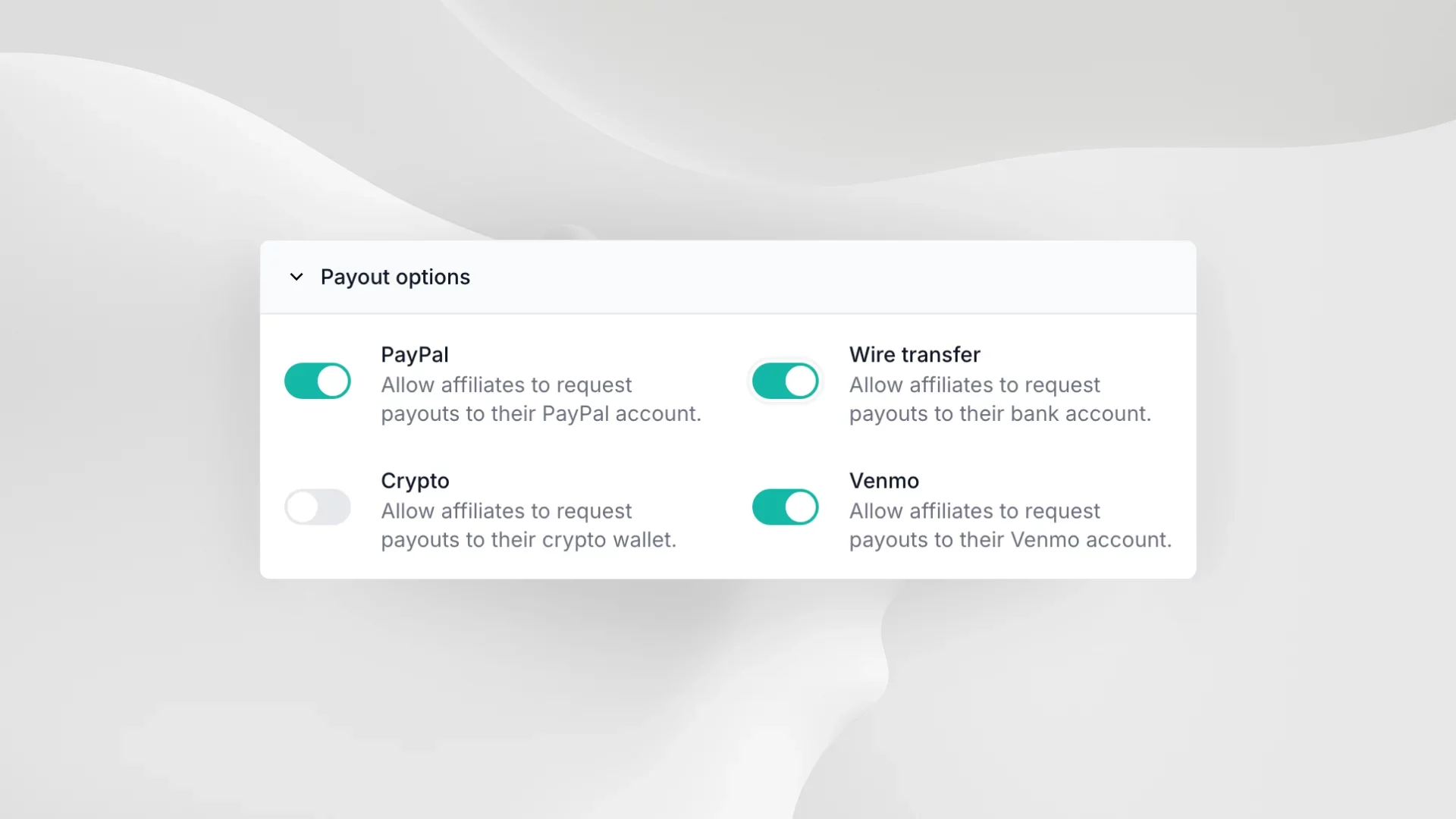
Additionally, you can enable different payout methods for individual partners, even if it is not available to your program as a whole. Useful for accommodating high-value affiliates with particular payment preferences.
How Partnero handles payouts: three models
Partnero offers three distinct approaches to payout processing, each suited to different program sizes and operational preferences.
Automated payouts (self-managed)
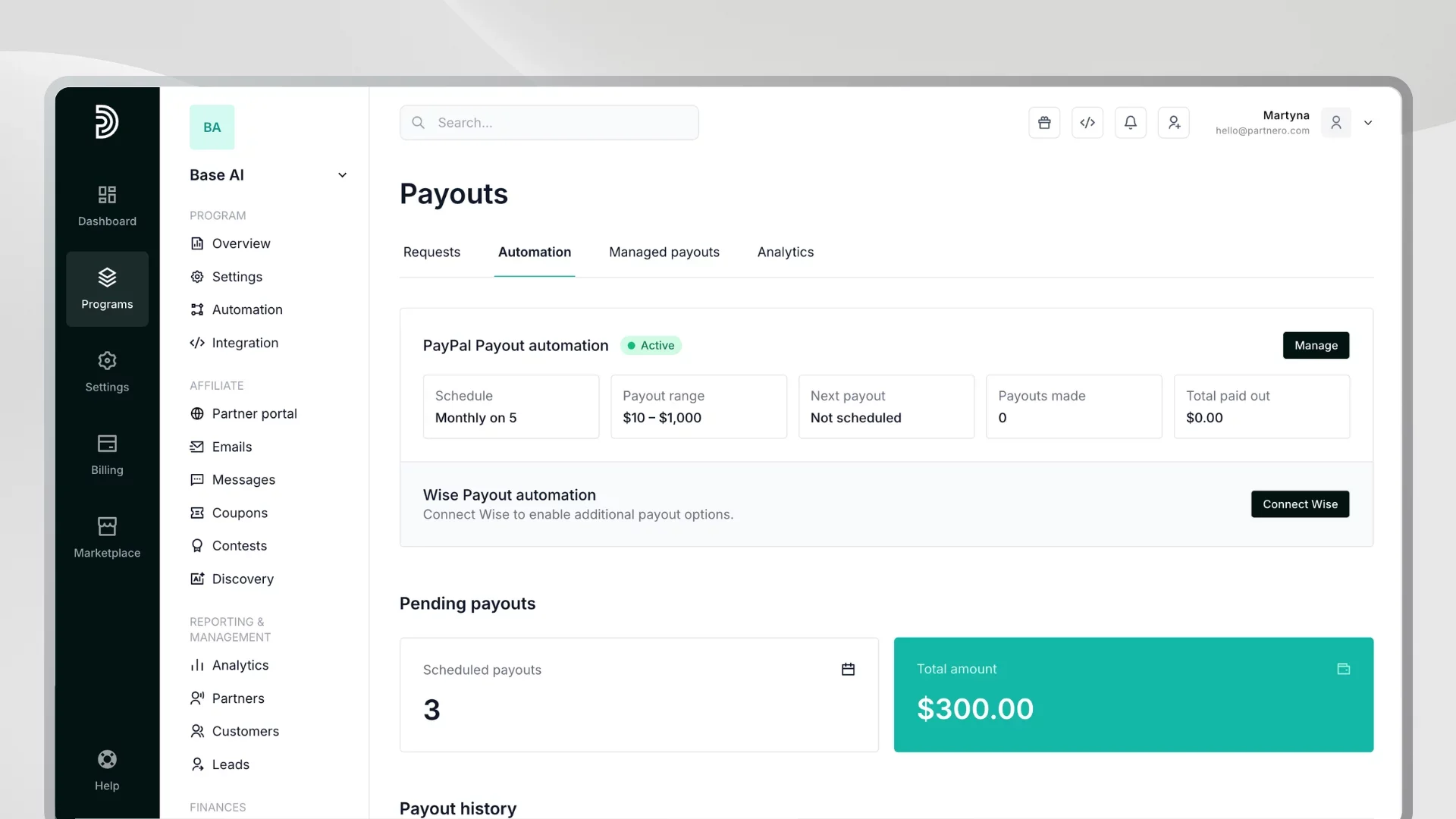
The most scalable option for growing programs. You connect your PayPal or Wise account to Partnero and configure a payout schedule for daily, weekly, specific-day, or monthly payouts. When the schedule runs, Partnero automatically processes all approved payout requests in batch, without any manual intervention.
You set minimum and maximum payout amounts to control how much goes out in each cycle. If the total exceeds your configured maximum, the automation pauses, giving you a safeguard against unexpected spikes. You can also enable automatic retry for any payouts that fail in a given cycle.
The result is a system that pays your partners reliably on schedule, at scale, without your team lifting a finger each time.
→ Read more about automated payouts
Managed payouts by Partnero
If you would rather not manage the payment infrastructure yourself, Partnero can handle the entire payout process on your behalf. You configure the schedule and thresholds, Partnero charges your card one day before payouts are due and distributes funds directly to your partners' PayPal accounts.
This consolidates your payout costs into a single invoice rather than dozens of individual transactions, making it much simpler to reconcile and track from a finance perspective. An additional fee of 7% applies to cover processing and payment costs.
Managed payouts are currently available for PayPal and are the right choice for teams that want a fully hands-off approach.
→ Read more about managed payouts
Manual payouts
For smaller programs or specific situations, manual processing remains an option. You review payout requests individually, approve them one by one, send payments outside Partnero, and then mark them as completed in the system. This gives you maximum control, though it requires the most time investment as your program scales.
To help manage volume, you can export the full list of payout requests to a CSV file and handle bulk processing or reconciliation outside of the platform.
Payout request flow: how much control do you want?
How payout requests are initiated and approved is one of the most important configuration decisions in your program. Partnero gives you three distinct models.
Partner-initiated requests with manual approval
The most hands-on approach. Partners log in to their portal and submit a payout request to withdraw their earnings. You receive the request, review it — checking the invoice, verifying the amount, confirming the payment details — and approve or reject it manually.
This model gives you maximum oversight and is a good choice when you want to verify each payout before it goes out, especially in the early stages of a program.
Partner-initiated requests with automatic approval
Partners still submit requests themselves, but approvals happen instantly without any manual review. Once a request is submitted, it moves directly into the processing queue.
This is a good middle ground: partners have to actively request their payout (which keeps the process partner-initiated and predictable), but your team is not required to review everyone. This works well when you trust your partner base and want to reduce administrative overhead.
Automatic payouts without requests
The most streamlined option for both you and your partners. When a partner's balance reaches the payout threshold, a payout is triggered automatically; no request is needed. Partners get paid as soon as they qualify, without having to log in and take any action.
This approach is particularly effective for programs with large numbers of active partners, as it eliminates the need for partners to remember to request payouts. When combined with scheduled automation, it creates a fully hands-off payout cycle.
Payout thresholds: setting the right conditions
Thresholds define when a partner becomes eligible for a payout. Partnero lets you set two types.
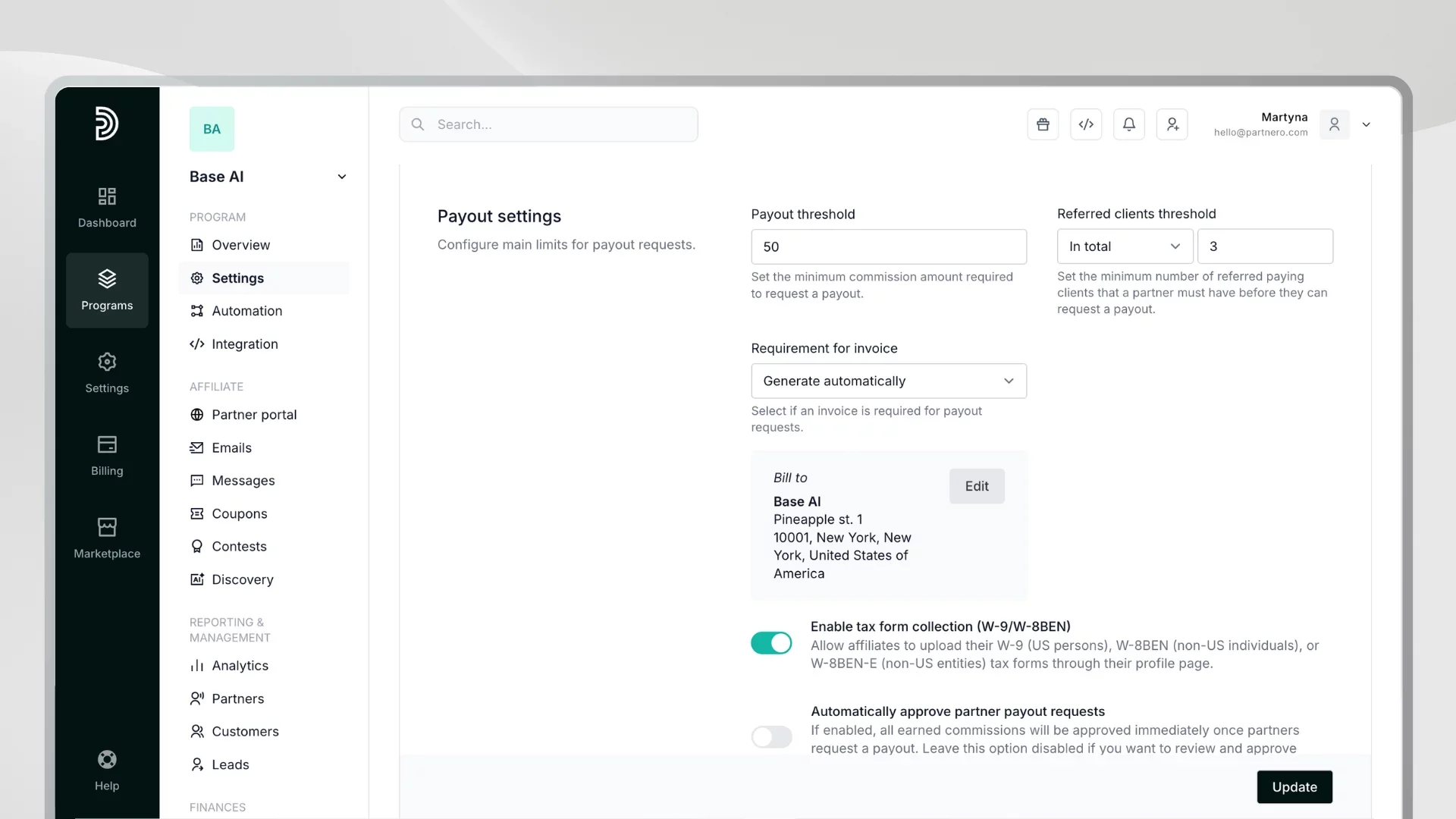
- Amount threshold: The minimum commission balance a partner must accumulate before requesting a payout. For example, requiring a minimum of $50 or $100 prevents a high volume of small payouts that are expensive and time-consuming to process. Partners see their progress toward the threshold in their portal, which can also motivate continued promotion.
- Referred clients threshold: The minimum number of paying clients a partner must have referred, either in total or per payout cycle, before they can withdraw. This is useful when you want to ensure partners have demonstrated real, sustained contribution to your business before receiving payment, rather than collecting a commission on a single referral and going quiet.
Both thresholds can be set independently or in combination. A partner must meet all configured conditions before a payout becomes available.
Invoices: staying compliant and organized
Depending on where your business is registered, you may be legally required to hold an invoice before making a payment to a contractor or affiliate. Partnero gives you four ways to handle invoice management:
- Not required: Partners are not required to upload invoices, as such, this step is not included in the payout process.
- Required: Partners must upload an invoice as part of their payout request. The request cannot be submitted without one. This is the right setting if invoices are mandatory under your local regulations.
- Optional: Partners can attach an invoice if they want to, but it is not required to submit the request. Useful when invoices are good practice but not legally mandated, and you want to accommodate partners who prefer to provide them without requiring everyone to do so.
- Auto-generated: Partnero generates the invoice automatically when a partner submits a payout request. You enter your billing information once, and the system produces a properly formatted invoice that includes both your details and the partner's payout specifics. Partners can preview and attach it before submitting.
This last option removes a significant point of friction; partners no longer need to create their own invoices, and you still get clean documentation for every payout.
→ Read more about requesting and managing invoices
Tax forms: collecting compliance documentation
For programs with US-based affiliates or international partners that receive payments, collecting tax forms may be required. Partnero supports W-9 collection for US persons, W-8BEN for non-US individuals, and W-8BEN-E for non-US entities.
When you enable tax form collection in your program settings, partners see a Tax Forms section in their profile where they can upload the relevant document. When a partner submits a payout request, you can access and review their uploaded tax form directly from the payout request detail view, or from within their partner profile at any time.
This keeps all compliance documentation in one place and eliminates the back-and-forth of collecting forms through email.
→ Read more about tax form collection
Individual partner settings: flexibility where it matters
Program-level settings apply to all partners by default, but not every partner has the same needs. Partnero allows you to override certain settings at the individual partner level.
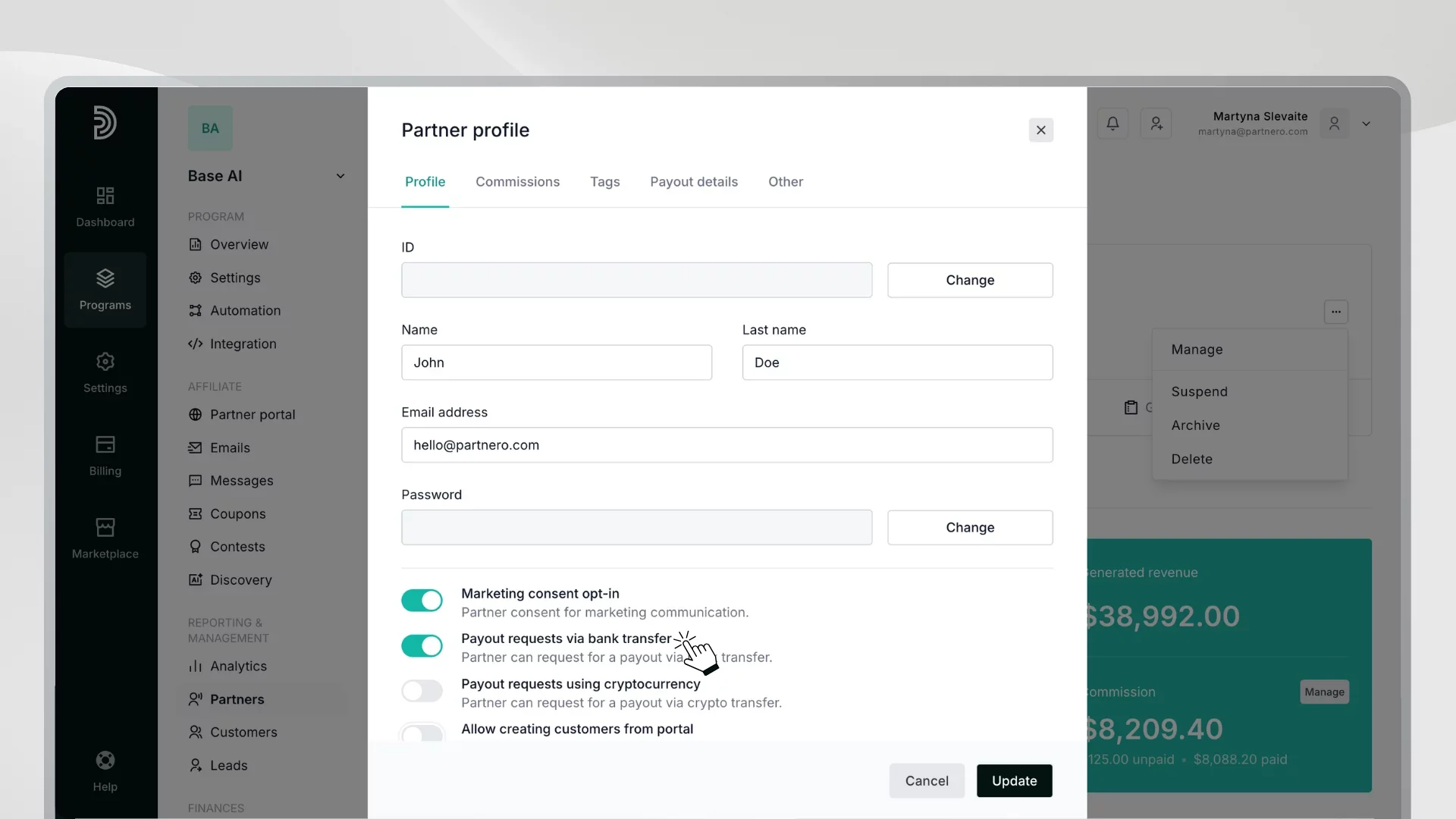
The most common use case is enabling bank transfer payouts for a specific partner. If your program does not offer wire transfer as a general option but a particular high-value partner requests it — perhaps because they are in a region where PayPal is not reliable, or simply because they prefer direct deposit — you can enable it for that partner alone without changing your program-wide settings.
This flexibility is especially useful for managing enterprise affiliates, agency partners, or anyone whose payment needs fall outside your standard setup.
Payout analytics: understanding what is happening with your money
Paying affiliates is not just a logistics problem; it is a financial management one. Partnero's payout analytics give you a real-time view of where your commission money sits at every stage of the pipeline.
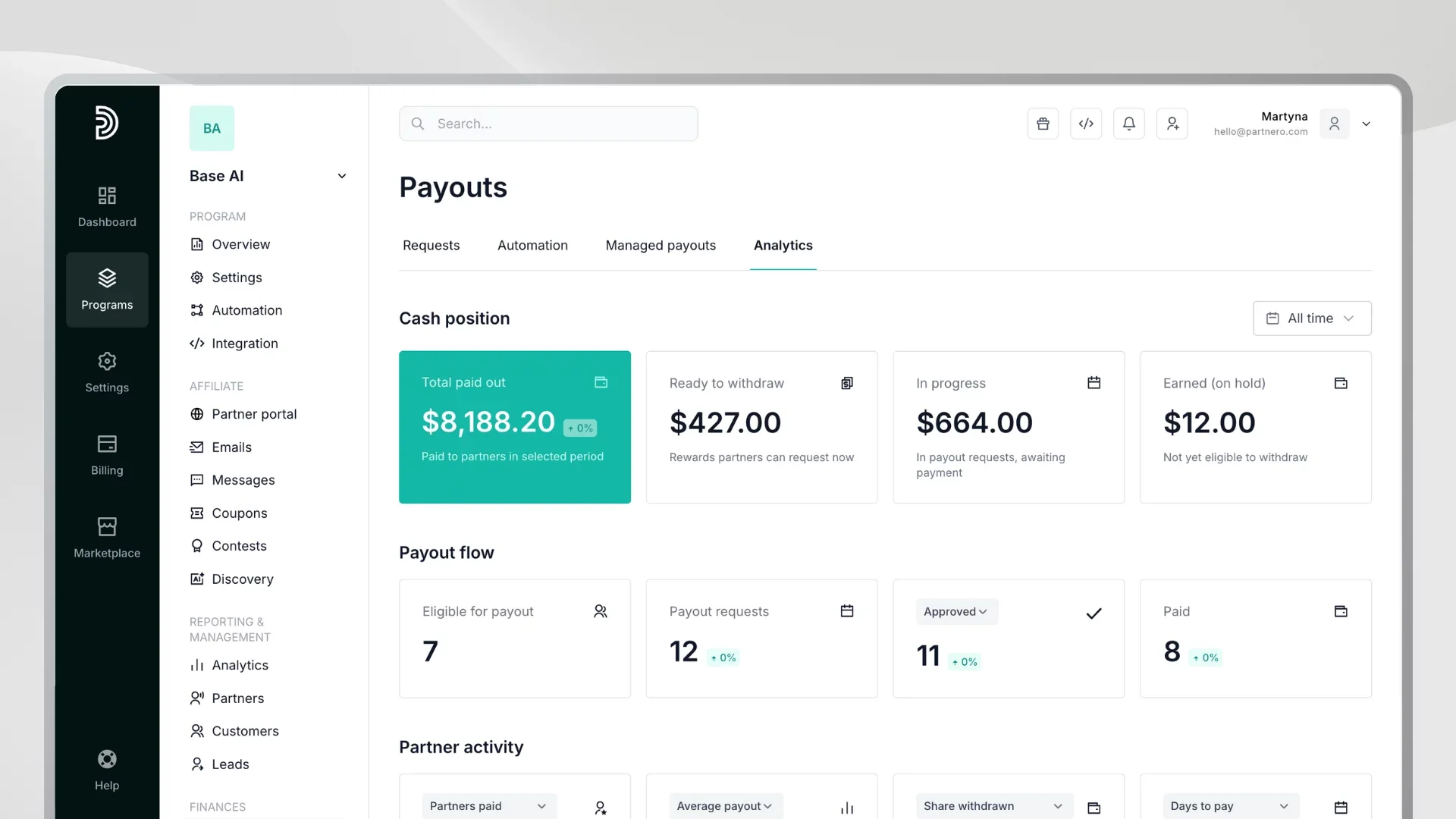
Cash position
At a glance, you can see:
- Total paid out: the total amount sent to partners in any selected period, broken down by currency.
- Ready to withdraw: the current balance partners are eligible to request, but have not yet.
- In progress: the total value of payout requests that are pending, approved, or scheduled but not yet completed.
- Earned (on hold): commissions partners have earned but cannot withdraw yet — because they are still in a review period or have not met all program conditions.
This view tells you your current financial exposure and helps you anticipate cash needs before payouts run.
Payout flow
The payout flow section tracks how requests move through your system over time:
- How many partners are currently eligible for a payout
- How many requests were created, approved, waiting for review, rejected, or paid in any given period
- Failed payouts that were scheduled but could not be processed
This is particularly useful for spotting bottlenecks. If you see a large number of requests sitting in "waiting" status, it signals that manual review may be creating a backlog. If failed payouts are accumulating, it points to an issue with your payment integration that needs attention.
Partner activity
Beyond the numbers, payout analytics surface engagement signals:
- How many partners were paid in a given period
- How many received their first-ever payout (a strong activation signal)
- How many are repeat payees
- Average and median payout amounts
- The average number of days from payout request to payment completion
The "days to pay" metric is particularly telling. A long average, say, 15 or 20 days, may indicate that your approval process is creating delays that erode partner trust. Shortening that number, either through automation or faster manual review, directly impacts engagement.
Unclaimed balance by age
This table breaks down your outstanding partner balance by how long it has been sitting unclaimed — 0 to 30 days, 30 to 60 days, 60 to 90 days, and 90 days or more. Older balances can indicate partners who have become disengaged, or who may not know how to request a payout. Identifying them gives you an opportunity to follow up, re-engage, and clear stale balances before they become an accounting problem.
Top partner concentration
The top partner analysis shows how much of your total payout volume is concentrated among a small number of affiliates. If your three largest partners account for 80% of total payouts, that is a concentration risk — losing any one of them would significantly impact your program. Partnero flags this with a dependency risk warning when a single partner receives 70% or more of the total payout volume.
Putting it all together
Affiliate payouts sit at the intersection of partner experience, financial management, and operational efficiency. Get them right, and you reinforce trust, reduce admin overhead, and give your program the foundation it needs to scale. Get them wrong, and you lose the partners who drive your growth.
Partnero is built to handle every dimension of this:
- Multiple payout methods: PayPal, wire transfer, Venmo, and crypto
- Automated payouts via your own PayPal or Wise account, on a schedule you define
- Managed payouts handled entirely by Partnero, consolidated to a single invoice
- Flexible request flows: manual, auto-approved, or fully automatic without partner action
- Threshold controls: by amount, by number of referred clients, or both
- Invoice management: required, optional, or auto-generated
- Tax form collection: W-9, W-8BEN, and W-8BEN-E, stored and accessible in the platform
- Individual partner settings: for cases where one size does not fit all
- Payout analytics: a full financial picture of where your commissions stand at every stage
Whether you are running a small program or scaling to hundreds of active affiliates, the right payout setup is one of the highest-leverage decisions you can make.
Set up payouts in Partnero
Ready to see it in action? Start your free trial and have your payout flow configured in minutes; no technical setup required. If you have questions or want help designing the right payout structure for your program, get in touch, and we will walk you through it.
Frequently asked questions
Partnero supports PayPal, bank transfers (wire), Venmo, and crypto. You can enable any combination of these at the program level, and individual partners can be given access to additional methods even if it is not available to your program as a whole.
Yes. Partnero supports two forms of automated payouts. You can connect your own PayPal or Wise account and configure a payout schedule to process approved requests in batches automatically. Alternatively, Partnero's managed payout service handles the entire process on your behalf — charging your card and distributing funds to partners — and consolidates it into a single invoice.
With auto-approved requests, partners still submit a payout request manually, but it is approved instantly without any review on your end. With auto-payouts without requests, the payout is triggered automatically as soon as a partner reaches the threshold, no action required from the partner at all. The second option is more hands-off for both sides.
Yes. You can set a minimum commission amount a partner must earn before they can request a payout. You can also set a referred clients threshold, requiring partners to have referred a minimum number of paying customers before becoming eligible, either in total or per payout cycle.
Yes. You can require partners to upload an invoice when submitting a payout request, make it optional, or let Partnero auto-generate invoices on their behalf using your billing information. Auto-generated invoices eliminate the need for partners to create their own documents while still giving you clean records for every payout.
Yes. Partnero supports tax form collection for W-9 (US persons), W-8BEN (non-US individuals), and W-8BEN-E (non-US entities). Partners upload forms through their profile, and you can access them from the payout request view or directly from the partner's profile at any time.
Yes. While program-level settings apply to all partners by default, you can override specific settings for individual partners. The most common use case is enabling bank transfer as a payout method for a specific partner, even if it is not available program-wide.
With managed payouts, Partnero acts as the intermediary: you provide a card as the funding source, and Partnero charges it one day before scheduled payouts go out, then distributes funds directly to your partners' PayPal accounts. A 7% fee applies to cover payout and processing costs. This option is currently available for PayPal payouts.
Yes. You can export the full list of payout requests to a CSV file, making it straightforward to manage bulk processing or reconciliation in an external tool if needed.
Launch your program in minutes or get in touch for advanced setups.
Fast setup & easy migration
Connect Partnero to your tools, with support if you’re switching platforms.Automated, transparent payouts
Pay partners on schedule and save hours. No spreadsheets or manual errors.
Affiliate and referral program software trusted by 1,500+ businesses. Connect with Stripe, Paddle, Shopify and more.


Product updates, affiliate marketing tips, and growth insights.